About

Posts by :

Stunning beauty of gardens both great and small captured by Photographer of the Year winners

Stunning beauty of gardens both great and small captured by Photographer of the Year winners

June Sharpe has won the overall prize in the annual International Garden Photographer of the Year contest, which is now in its 17th year. Her inventive image, was of a conifer trees shot in a Kent, England – but transformed into an abstract, wallpaper-like pattern.

“The layered branches of this conifer reminded me of the dancing cranes often featured in Japanese woodcuts,” she tells us. But the effect, which also won her the 7iM Abstract Views category was achieved in Photoshop. “I added a fill layer and used exclusion blending mode to alter the colors and enhance the feeling of movement and sense of the ‘birds’ dancing in a fantasy woodland”. 

The image itself was shot with a Canon EOS 5D Mark III with Canon EF 24-105mm f/4 L IS USM lens, using an exposure of 1/350sec at f/5.6, ISO 800.

The separate RPS Portfolio category prize was won by Annaick Guitteny with a sequence of six square images of close-ups of plants, covered in water droplets.

Evanescence by Annaick Guitteny was the winner in the Portfolios category (Image credit: Annaick Guitteny / International Garden Photographer of the Year)

The eight other category winners are pictured below…

Flower Meadows of the Plateau by Albert Ceolan won the Wildflower Landscapes category (Image credit: Albert Ceolan / International Garden Photographer of the Year)

Ethereal Nigella won The Beauty of Plants category for Angi Wallace (Image credit: Angi Wallace / International Garden Photographer of the Year)

The Lone Tree by Andrea Graham won the Breathing Spaces category (Image credit: Andrea Graham / International Garden Photographer of the Year)

Annie Green-Armytage won the Beautiful Gardens category with this shot taken in a private garden in Suffolk, England (Image credit: Annie Green-Armytage / International Garden Photographer of the Year)

‘Tasty’ by Fernando Avanka won Wildlife in the Garden (Image credit: Fernando Avanka / International Garden Photographer of the Year)

Fire & Ice by Drew Buckley won the Trees, Woods & Forests category (Image credit: Drew Buckley / International Garden Photographer of the Year)

Icy Craterium by Barry Webb FRPS, winner of the World of Funghi category (Image credit: Barry Webb / International Garden Photographer of the Year)

Mangrove Tree (From Underwater) won Leena Roy the Plants & Planet category (Image credit: Leena Roy / International Garden Photographer of the Year)

See the IGPOTY website for the full rundown of the winners and runners-up – and for details of this year’s contest, which is now open for entries. 

A selection of the current winners is currently on display at Kew Gardens in London until March 10, before moving on to Cambridge University Botanic Garden, where the exhibition will be on display from March 20 until May 7.

Hometown photographer’s work honors Butts County Black veterans

Hometown photographer’s work honors Butts County Black veterans
image

In celebration of Black History Month, an exhibit of photographs honoring local African American Vietnam veterans is on display along Third Street in the area now known as “The Orchard.” The photographs were taken by Jackson native and award-winning photographer Johnny Crawford.

“Last year, during Black History Month, Johnny’s portraits were displayed using vets from around the state,” said Jackson Mayor Carlos Duffey in a Facebook post promoting the photo exhibit. “This year, local Jackson vets are being displayed during Black History Month. I watched Johnny Crawford photograph these men, and I sat and listened to their stories of how they endured war and made it home. It was one of the best days of my life. I have a new level of appreciation for each of them!”

Recommended for you

Featured Local Savings

How Shallow DOF Just Might Ruin Your Photography

How Shallow DOF Just Might Ruin Your Photography

Why are photographers obsessed with shallow depth of field? And why I think it can ruin your photography as it almost did with mine. Read on about how it started to affect my photography and what I did about it. 


I hear the judge’s voice “How do you plead, Vojkan…” 
“It is pronounced Voy-Khan, your honor.” I mumble to myself.
“…on account of excessive use of shallow depth of field?”
“Guilty your honor.”
“I sentence you to 15 years of using lenses with aperture of f/4 or smaller. Your only lens will be a zoom. 28-200mm variable aperture. f/4.5-f/6.1!”

I wake up in a cold sweat and this thought keeps coming back to my mind — why are we (at least most photographers I know) so obsessed with shallow DOF? I am not talking about bokeh, but shallow depth of field in general. At one time I was pretty obsessed with it.

The Beginning 

My journey in photography started way back when in 2007/08. I bought my first “serious” camera, a Fuji FD6500. It was a toss-up between it and a Canon PowerShot (some pocketable model with power zoom). The Canon 350D was well out of reach and film cameras were out of the picture as well. Even back then I thought a bigger lens equals more professional results, which as we all know is defined by shallow DOF. And the Fuji had a bigger lens compared to the Canon.

Well, I was wrong. Both about the Fuji’s shallow depth of field (wonderful camera, but everything is in focus as you’d expect from a small sensor camera) and that pro photography is all about shallow depth of field.

And, there I am, shooting with my little Fuji, everything in focus. But I desperately want my images to look good. So, I start experimenting: editing, composition, reading books on photography, emulating (copying) old masters, searching for light, contrasty scenes…

Until I bought my first “real” DSLR. Canon 5D Mark I. 2009. Used. I bought one lens, the 50mm. To test the cameras I was looking at. And to have at least one lens. I was blown away. First by the image quality and second by the shallow DOF. Yes, finally! Pro photographer results!

The next lens I bought was a 35mm f/2. Not enough shallow DOF! I got myself a Sigma 35mm f/1.4 soon after. Next lens: 85mm f/1.8. Holy cow! The magic is happening at apertures below f/2. Back then, I didn’t care about zooms at f/2.8. Unless they are 70-200mm and above, then yes as it gives me a shallow depth of field; It blurs out everything into oblivion. 

After some time I settled with this combination 35/50/85. I got everything I needed in those three lenses: Light, affordable, and fast.

The Effect

After a few years, I noticed that all of the things that made me a decent photographer were slowly dying in front of my eyes. I stopped looking for light because, you know, shallow DOF will take care of everything. I stopped looking for nice scenes. I stopped looking for composition. I just stopped caring about other elements of photography, because shallow DOF will take care of everything. 

It affected my photography in the most horrible way. Something that I am struggling with to this day. Poor compositions, poor lighting, poor scene selection.

The Solution

But, I am working on it. Mindfully closing down apertures to f/2.8, f/4, etc… Slowing down the pace. Pushing myself to think about other elements constantly. I even started using a zoom lens. Something unthinkable because, you know, primes equal shallow DOF.

All of this has a very positive effect on me and my photography. First, I noticed that clients don’t really care about things I care about. Not one client ever said “Wow. I love how blurry the background is.” Second, I noticed a nice bump in good composition and using good light to my advantage. I’m not always satisfied, but it has been a gratifying process.

The Question 

And I started wondering, why am I and other people so obsessed with it? I know immensely gifted photographers who are always salivating at f/1.2 lenses. Because f/1.4, and god forbid f/1.8, are so lame. And they are pretty open about it. “It will give me more blur” or “I want the background to be completely blurry.”

So, what is it? Why?

My opinion is that we are obsessed with it because we can buy it. It is one photographic element that you can actually purchase. I mean, it has its uses, but shooting everything at f/1.4 just because you can is just lazy.

Other photography elements like composition, reading light, picking out a good scene for a shoot, or being able to see a part of of scene and use it to your advantage… it takes time, effort, failure, and grit to master those. Shallow DOF just needs a trip to your local camera dealer and buy a new lens.

What are your thoughts about it? Are you obsessed with it as I once was?

Award-winning photographer works available for purchase at Milford Museum

Award-winning photographer works available for purchase at Milford Museum
imageimage

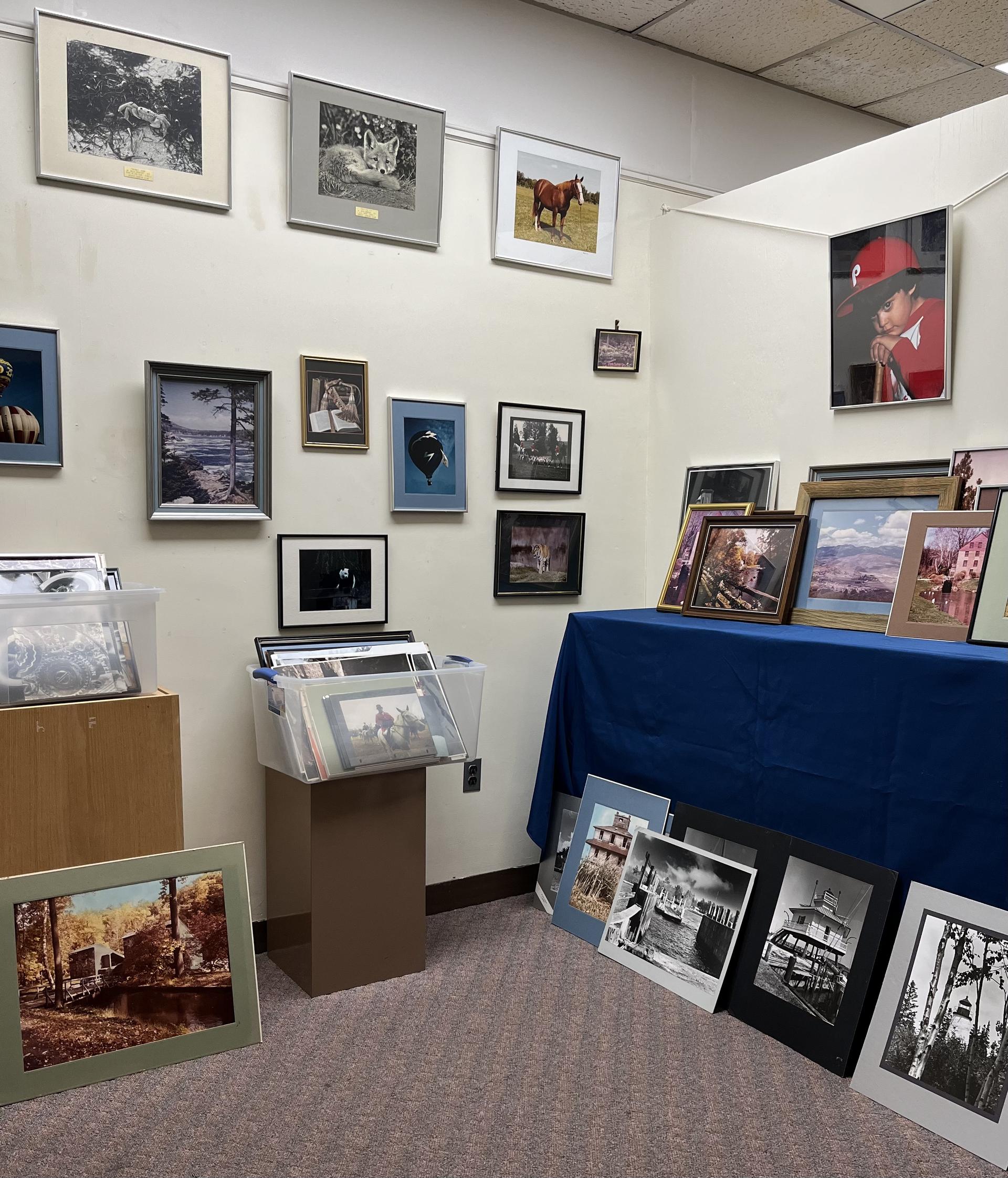
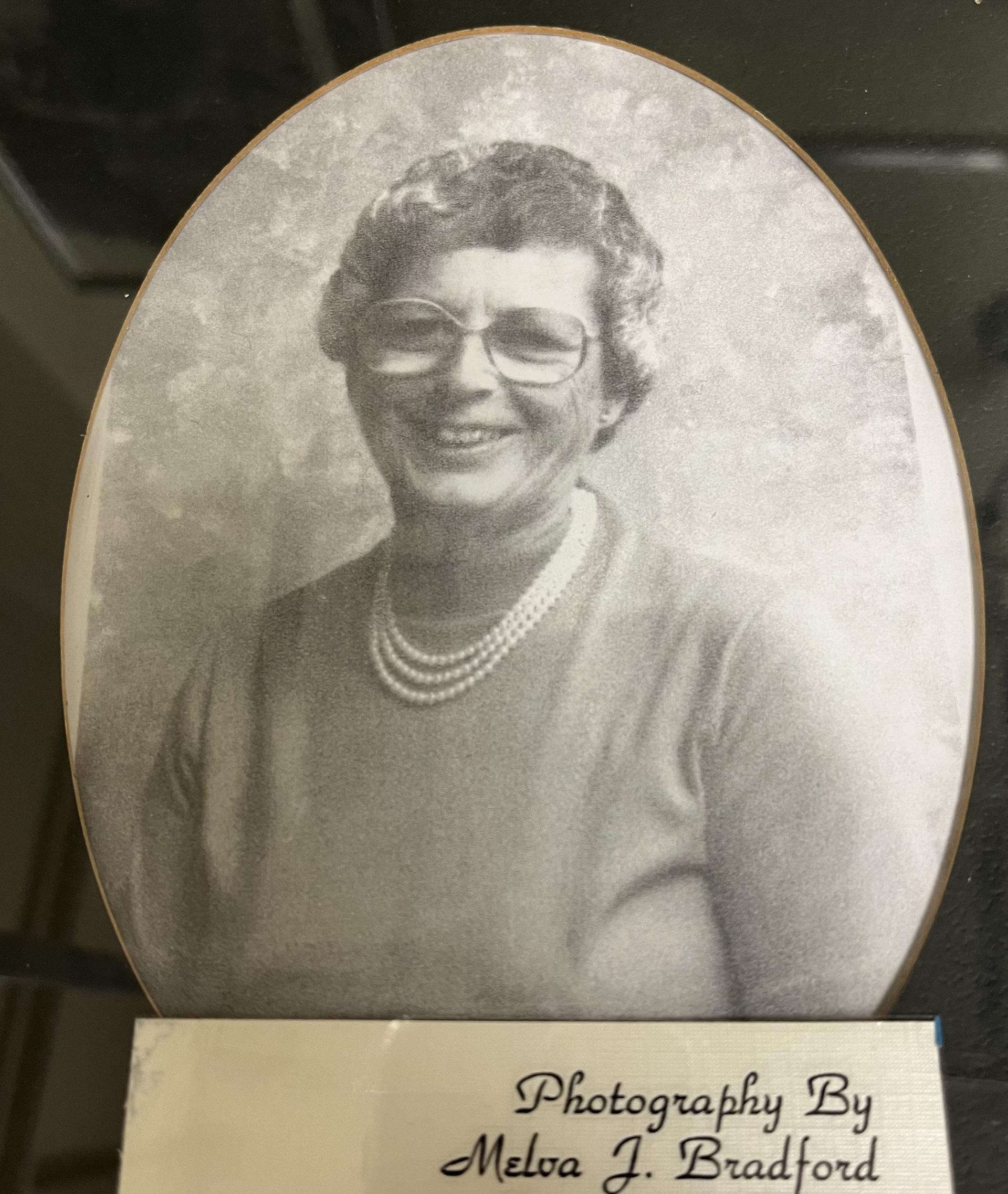
Collection of photographs by Melva Jane Bradford on display and for sale at the Milford Museum

The family of the late Melva Jane Bradford, whose landscape, animal and still life photos received multiple awards, donated a large portion of her collection to the Milford Museum. The items are now for sale at the museum.

“The collection contains a wide array of scenes, including landscapes, animals and still life,” Denise Curtis, a board member with the museum, said. “Some are framed and matted while others are available for you to surround with your own frame.”

Bradford grew up in the Milford-Frederica area but traveled the world as a member of the United States Air Force. After tours in Maine, Germany and Washington, DC, she was assigned to the Communications Center at the Pentagon before transferring to Dover Air Force Base as the first enlisted single WAF. Although Bradford enjoyed being back in her native state, a promotion took her to Virginia where she passed away. At the time of her death, she was planning a move back to her home state.

Melva Jane Bradford

“She was considered by many to be a renaissance woman,” Curtis said. “She owned and fixed her own cars, enjoyed computers and, of course, cameras. She saw beauty in everything as is evident in her photographs.”

Many of the photographs taken by Bradford can be found at the Delaware State Archives as well as the University of Delaware. Her work has also been featured in several books published by Holly Press in Hockessin. In addition to the collection of photographs, Bradford’s family donated an additional $500 to the museum.

imageimage

Milford Museum is located at 121 South Walnut Street in Milford. Their hours are 10 AM to 3:30 PM Monday through Friday. For more information, call 302-424-1080 or email [email protected]. Photographs can also be purchased online by visiting the Support link on the museum website.

RELATED STORIES:

Share this Post

I edit photos every day, but I only ever use one app — Here’s how Pixelmator Pro can transform any image in seconds

I edit photos every day, but I only ever use one app — Here’s how Pixelmator Pro can transform any image in seconds

There are so many photo editing apps available for Mac that it can sometimes be a daunting prospect trying to pick one. Of course, there’s Photoshop, which is literally now synonymous with editing images the world over. Then there’s also Adobe Lightroom, GIMP, Luminar Neo, and more. Apple even has its own editing suite built into Apple Photos, and there are plenty of online tools available, too, such as Canva. But for me, one app has proven ever-present in my workflow, and ultra-reliable when it comes to results. As a certified novice when it comes to both photography and editing, I need an app that does everything for me. Enter Pixelmator Pro. 

I was first introduced to Pixelmator Pro a couple of years ago, and it is now, by far, the most-used app on my Mac. Pixelmator Pro is one of the best photo editing apps for Mac, and I use it to edit all the photos I take on my DSLR, but thanks to intense integration with Apple’s ecosystem, it’s also perfect for editing photos taken on my iPhone. 

The thing I love the most about Pixelmator Pro is that it’s photo-editing on autopilot. You don’t need to know the first thing about white balance, hue (whoever he is), saturation, sharpness, or anything else for that matter. While all these options and tweaks are available to those who need them, I’ve found the value of Pixelmator Pro to be held in its incredible “ML Enhance” feature and its array of excellent films, which are refined Instagram filters. Let me show you how I use it to transform an image in seconds. 

Pixelmator Pro has an option to open iPhone shots directly from your Photos app on the Mac. As long as your iCloud sync is up and running, images you take on iPhone are automatically synced to your Mac and then can be opened directly in Pixelmator Pro. Pixelmator Pro recently added support HDR, which is great for some of the HDR photos I take on iPhone and it also supports Apple’s ProRAW format, so I can edit images in RAW for more control. 

Cropping and positioning

Pixelmator Pro on Mac

(Image credit: Future)

Sometimes you can make a photo much better just by cropping it. Literally hitting the C key brings up a comprehensive cropping screen. There are controls for aspect ratio, rotation and tilt, and a series of grid overlays such as Rule of Thirds and Grid, which can be used to get the image positioning just right. However, as I’ve said, for me Pixelmator Pro is all about convenience, so I’ll often hit the ML Crop button to see what the software thinks of my photo. Sometimes it gets it right, other times not, but it’s so easy to toggle the machine learning adjustments that cropping your image is a breeze.  

Color adjustments

Pixelmator Pro on Mac

(Image credit: Future)

The fun part comes in the Color Adjustments tab, again reached with a simple key press (A). While pros could spend hours in every single setting tweaking and re-tweaking, I often edit photos on the fly, and speed and expedience are usually the main goal. To that end, the first thing I do is hit the ML Enhance button. Just like ML Crop, ML Enhance uses machine learning and AI to transform your image instantly. The changes are often subtle, but I’ve never seen it make an image worse. It tweaks color, exposure, contrast, brightness, shadows, and more. If you’re feeling ambitious, you can tweak each section individually. For example, you can toggle White Balance settings, including whether you want ML editing in that particular area. This means you can set AI to edit the whole piece or just individual aspects like Color Balance. 

More often than not, however, I simply roll with whatever ML Enhance throws out in the first instance, if I don’t like it, I can simply click the same button again to remove/undo the changes.

 Films 

Pixelmator Pro on Mac

(Image credit: Future)

The third and usually final act in editing these photos comes from Films. As I’ve mentioned, these are really like Instagram filters on steroids for your iPhone pictures. There are eight categories, including Vintage, Black & White, and Modern, each with several individual films. Just like the AI adjustments, you can simply click on a filter to see its effects, clicking on it again to remove it if you don’t like it. 

Sometimes, I’ll be content enough with an image that it doesn’t need a film, but if it does, adding one replaces the aforementioned Color adjustments. If I like the film better than the Color Adjustments, I’ll stick with it, but if there’s still something missing, you can hit the ML Enhance button again while a filter is active to get the best of both worlds, a carefully curated film with AI adjustments made over the top 

This might sound a bit hectic, but it’s very simple once you get the hang of it. Pixelmator lets me crop and color adjust images usually in around 10 seconds. Of course, I’m not plumbing the depths of pro photography here or freelancing as a wedding photographer, but for my daily needs, this workflow is absolutely perfect. Here’s a quick look at a trio of edited images that Pixelmator Pro gave me. 

As you can see, I’ve cropped this shot to 16:9 and really quite like it, I love the colors from the floral arrangement, but, being Scotland, it all feels a bit washed out and grey.

iPhone photography week Pixelmator Pro

(Image credit: Future)

I threw a film on it (Cinematic 1 if you were wondering) and immediately preferred the colors here.  

iPhone photography week Pixelmator Pro

(Image credit: Future)

For the final touch, I then added the ML Enhance on top of the film, which restores the festive red to much of the decor (and the parked car). 

iPhone photography week Pixelmator Pro

(Image credit: Future)

Truthfully, I actually prefer the second of these three images, but this is the beauty of Pixelmator Pro. Its one-touch AI enhancements let me make hefty changes at the touch of a button, and undo them just as quickly. While it’s not going to win me any photography awards, it’s certainly an improvement. 

While Pixelmator Pro is not free, its $49.99 price tag is much more generous than the cost of some photo editing suites, and there’s even a free trial for Mac. If you’re a budding iPhoneographer and want a quick and easy way to take your images to the next level, I can’t recommend it highly enough.

Do you use Pixelmator Pro? Share your photos with iMore on X (Twitter) using #iMorePhotographyWeek

Sarfo Emmanuel Annor: “I Want to Showcase the Beauty of Black Skin”

Sarfo Emmanuel Annor: “I Want to Showcase the Beauty of Black Skin”

Ahead of his debut solo exhibition in Paris, AnOther meets the Ghanian artist painting jewel-like portraits of people from his hometown

February 19, 2024

Sarfo Emmanuel Annor’s portraits hum with a meditative frequency. Strong, primary-coloured backgrounds lay the foundation, in front of which his radiantly dressed subjects appear to levitate on a separate plane. Colours are exclusively bold but Annor keeps them in careful balance, creating perfectly tuned compositions with an almost holy aura.

The 22-year-old artist has made this deft interplay of light, colour and emotion the raison d’etre of his growing practice, creating jewel-like portraits of people from his hometown of Koforidua, southern Ghana. Last year, Annor received his debut solo show at the Bridge Gallery in Paris, and most recently, featured at the fifth edition of 1-54’s Contemporary African Art Fair, held recently in Marrakech.

Founded in 2013 by Touria El Glaoui, 1-54 remains the first and only international fair dedicated to contemporary African art. Featuring galleries from across the continent alongside international counterparts that reflect the wider diaspora, 1-54 has supported young artists like Annor from the outset.

As is true of many emerging African photographers, from Ismail Zaidy to Derrick Ofosu Boateng and fellow Ghanaian Prince Gyasi, Annor started out taking photographs on his smartphone. Combining his day job as a designer’s apprentice with a background in painting, photography offered a way of uniting both. “I started with taking photographs of family and friends,” says Annor. “Especially my niece – I used to do only portraits of her in the beginning.”

More recently, Annor’s list of collaborators has expanded but two things remain unchanged: all are children and all share dark skin tones. “Kids have this special aura around them,“ explains Annor. “They represent the future and that makes the work really special for me.”

The choice of shooting dark skin tones, on the other hand, offers a technical advantage, providing a high contrast with the textured white walls Annor uses as his backdrops so that their colour can be easily changed later. But the decision is also an integral part of Annor’s ambition to channel the radiant energy and vitality of his home. “I want to showcase the beauty of Black skin to the world,” says Annor, whose sitters all hail from Koforidua’s population of just under 100,000. “One of the main symbols in my photography is embracing dark skin and challenging African stereotypes around it.”

In spite of their relative locality (all his photographs were shot against found white walls in Koforidua), this Pan-African sentiment runs through Annor’s work, down to the ceremonial cloths worn by his sitters, which he has collected from different countries across the continent.

These exquisite fabrics are just one of several colour inputs that Annor uses to play with the emotional resonance of each portrait. “I really believe these colours can lighten your mood,” he says. “If you’re having a bad day, these colours can directly influence your emotions.” Each portrait reflects a different mood and each mood a colour, but Annor also brings narrative to his portraits with playful symbolism. In one photograph, a model stands with her back to the camera, an open book resting on top of her head (Burdened, 2021). “Here in Ghana, most kids face a lot of pressure around school from their parents. The concept is about how learning can become a burden and that they also need to play to be kids.”

Though he cites René Magritte and Vincent van Gogh as influences, closer similarities to Annor’s style can arguably be found in the work of pioneering US painter Barkley L Hendricks. Paintings like Misc Tyrone (Tyrone Smith) (1976) and Blood (Donald Formey) (1975), in particular share clear parallels with Annor’s intuitive sense for colour and sharp tailoring, as well as his elevation of Black skin.

Perhaps it’s little surprise, therefore, that Annor has his sights set on taking his work into museum spaces and sharing the same walls as his idols. “My dream is that one day I will show my work somewhere like Tate,” says Annor. “I want to continue developing works like this, works that promote a uniquely African beauty and tell stories of African youth.”

Sarfo Emmanuel Annor’s debut will go on show at the Bridge Gallery in Paris from 21 – 26 February 2023.

B&H takes up to $500 off Canon mirrorless cameras and up to $300 off lenses in spring sale

B&H takes up to $500 off Canon mirrorless cameras and up to $300 off lenses in spring sale

B&H is kicking off a new pre-spring photography event today with tons of Canon gear on sale. You’ll find price cuts on some of the more recent mirrorless cameras, as well as tried and true solutions for portraits, landscape photography, and capturing street shots. Not to mention lenses, too. Everything is at least $100 off and starts from $499 shipped. We break down all of our favorite deals below, or you could just peruse the offers yourself.

Canon mirrorless cameras on sale:

Canon lenses on sale:

More on the Canon EOS R5 Mirrorless Camera:

For the professional image-maker who needs resolution, speed, and video capabilities, the Canon EOS R5 full-frame mirrorless camera features a newly developed 45MP CMOS sensor, which offers 8K raw video recording, 12 fps continuous shooting with a mechanical shutter, and is the first EOS camera to feature 5-axis sensor-shift image stabilization.


Subscribe to the 9to5Toys YouTube Channel for all of the latest videos, reviews, and more!

Recent VideosRecent Videos

Underwater photo competition showcases stunning images of marine life

Underwater photo competition showcases stunning images of marine life

Diving northern gannets

Kat Zhou/UPY 2024

Snowy-white northern gannets (Morus bassanus) plunge into the icy waters of the North Sea in search of food in this action-packed photograph taken off the Shetland Islands in Scotland.  The seabirds are almost as big as an albatross, with a wingspan of up to 180 centimetres. They are also uniquely adapted to high-speed diving, with strong neck muscles and nostrils inside their bills that can be closed to prevent water entering.

The shot was one of the many spectacular entries to the 2024 Underwater Photographer of the Year competition, which celebrates the wonders of the marine world. Here are some of New Scientist’s top picks from this year’s contest.

Virgo wreck near Recife, Brazil

Fabi Fregonesi/UPY 2024

In this photo by Fabiana Fregonesi, a school of fish swarm around a wreck, forming a shape resembling the boat’s sail for a fleeting moment. The shipwreck, called Virgo, was deliberately sunk in 2017 to be a dive site near Recife, Brazil.

“The feeling I had at the time was that the ship was ready to set sail, beginning its journey towards an unknown adventure,” Fregonesi said in a statement.

The eye of a grey whale

Rafael Fernandez Caballero/UPY 2024

The eye of an eastern grey whale (Eschrichtius robustus) pierces this mysterious shot taken from just above the surface of a saltwater lagoon in west Mexico. These marine mammals are friendly creatures, often showing their curiosity by approaching boats. Grey whales go on one of the longest annual migrations of any mammals – from feeding grounds in the Arctic southwards along the west coast of North America to the warm lagoons of Baja California, Mexico.

An octopus ringed by a pyrosome

Dennis Corpuz/UPY 2024

In stark contrast to the gigantic grey whale, this tiny 10-centimetre-wide organism was captured up close in the deep waters of the Philippines. The circular subject of the image is a pyrosome – a colonial animal that is made up of hundreds of thousands of minuscule individuals called zooids. Enveloped inside the bizarre pyrosome is a little octopus, just peeking out.

A diving cormorant

Jon Anderson/UPY 2024

This ravenous cormorant makes a beeline towards the photographer Jon Anderson’s camera, after mistaking it for a fish. The extraordinary photo was taken in a kelp forest at a dive site in Monterey, California, during a bright summer afternoon. Many cormorant species rely on these special marine ecosystems to survive; however, local kelp forests have declined 80 per cent in the past decade.

A stranded sperm whale

Nuno Sá/UPY 2024

Dozens of beachgoers in southern Portugal attempt to save a sperm whale (Physeter macrocephalus) in this magnificent aerial shot.

“Together they push and chant, trying to help the giant back into the sea, as it slowly slaps its tail back and forth, and breathes heavily,” said photographer Nuno Sá in a statement. Despite their best efforts, the whale died several hours after reaching the beach – its body crushed under its own weight.

Topics: