Photography

Ten women photographers present ‘Women’s Perspectives 2024’ at Image City Gallery

Ten women photographers present ‘Women’s Perspectives 2024’ at Image City Gallery

Rochester, N.Y. – Women photographers are at the forefront of a show at the Image City Photography Gallery on Friday.

The exhibit is called “Women’s Perspectives 2024” and showcases how each artist views the world through their own lens.

Each artist also includes their unique representation of the event’s theme, “Reflections”.

“It’s about capturing a story,” said featured artist, Melissa Mance-Coniglio. “It’s trying to capture a moment that was super fleeting so others can share about their experiences.”

CLICK HEREfor more information on the free event.

Photography exhibition begins at Punjabi varsity

Photography exhibition begins at Punjabi varsity

Tribune News Service

Patiala, April 19

The Vice-Chancellor of the university, Prof Arvind, inaugurated the photo exhibition organised by the Sobha Singh Fine Arts and Museum and Art Gallery. Addressing the gathering, he said, “In today’s times, anyone who has an interest can learn the art of photography. The continuous development of technology has also opened up many new avenues for the field of art.”

Talking about the photos at the exhibition that were clicked by Jaskaran Singh and Ranjodh Singh, Prof Arvind said such exhibitions inspire students and also help them learn art in different forms by observing the work of expert students.

Department Head, Dr Kavita Singh, said this exhibition would continue until April 30. She said technical aspects of photography would also be discussed during a separate session by Ranjodh Singh and Jaskaran Singh.

Registrar Prof Navjot Kaur praised the department’s steps for the exhibition. She said nowadays, the parameters of intellectual relations have changed, adding that respect for the arts and other relevant skills has increased.

About The Author

The Tribune News Service brings you the latest news, analysis and insights from the region, India and around the world. Follow the Tribune News Service for a wide-ranging coverage of events as they unfold, with perspective and clarity.

Wildlife Photography That’ll Knock Your Socks Off

Wildlife Photography That’ll Knock Your Socks Off

The winners of the 2024 Sony World Photography Awards have been announced, but it’s the wildlife photography produced by the runners up that knocks our socks off. Let’s see if you agree. Here are just a few of the short-list finalists in the Natural World & Wildlife category.

In this first image, Christopher Ratcliffe Iverson of Nature’s Echoes Photography says he “caught an unforgettable moment with a fox in a field that glowed like spun gold.”

wildlife photography 2
Image by Christopher Ratcliffe Iverson, 2024 Sony World Photography Awards Short List

Photographer Thien Nguyen Ngoc captured the incredible moment below. A sperm whale surfaces as her calf nurses.

wildlife photography 4
Image by Thien Nguyen Ngoc, 2024 Sony World Photography Awards Short List

Next, Pedro Jarque Krebs’ wildlife portraiture is nothing short of incredible. His photo of roosting bats made the short list in the 2024 Sony World Photography Awards competition.

wildlife photography 3
Image by Pedro Jarque Krebs, 2024 Sony World Photography Awards Short List

Finally, there’s this absolute gem captured by Jonathan McSwain. Seeing these playful river otters frozen in time gives us goosebumps.

Image by Jonathan McSwain, 2024 Sony World Photography Awards Short List

We think this is wildlife photography at its best. Which image is your favorite?

Vintage Pic of a Bearded, Masked Man Inspired ‘Batman’?

Vintage Pic of a Bearded, Masked Man Inspired ‘Batman’?
image
Claim:

A vintage 1892 photograph of a bearded butcher, Bill Smith, in a bat mask, was the inspiration for the character of Batman.

For years, a purported vintage photograph of a bearded man in a mask has circulated on the internet claiming to be the inspiration for the famed comic-book vigilante Batman. While we’ve done Batman-related legends before, this one has certainly spread far and wide without much evidence to support it. 

The claim has many variations. A number of posts on X claimed Wayne Bruce, a Scottish man who was the descendant of the Scottish king Robert the Bruce, was the inspiration for Bruce Wayne, the man who would go on to don Batman’s mask, including one in April 2024: 

According to another story attached to this photo, the man was a butcher named Bill Smith and the photograph was taken in New York City in 1892. 

The above photograph was not actually the inspiration for the character of Batman. 

We searched for the origins of the photo using reverse-image search and were directed to numerous reposts, as well as articles that claimed different sources. The photograph was on Reddit back in 2017, and appeared on Bandcamp, an audio distribution site, as a profile picture for user Dennis Kelly

The photograph also appears on the art and photography workshop Foto Marvellini, which was founded in 2011 and appeared to specialize in editing photographs to make them appear vintage. Titled “Bat barbone,” the image appears alongside other vintage photographs of people from different time periods wearing similar masks. Per the “Bat barbone” image description, it was “Printed in the darkroom and treated with tannic acid” and “Mounted in a wooden frame from the early 1900s.”

Andrea and Carlo Marvellini of Foto Marvellini confirmed to us that this was their original work and the first “Bat barbone” print was made in 2012. They digitally manipulated original photographs sourced from the U.S. Library of Congress from the 1860s and 1890s, inserting a mask in post-production. They also shared articles from art magazine Artribune and newspaper il Fatto Quotidiano, which covered their work in 2014 and 2016. 

They described their reasoning behind such works:

Our collective declines the theme of the “fake” in photography, plays with the absurd, celebrates past techniques, creates credible ancestors and faithful post-mortems. With [our] deliberately “deceptive” works, Foto Marvelli invites the viewer to remember that images in general, by nature, trigger and shape his emotions and his understanding of the world.

The claim that this man was the original inspiration for Batman also appeared back in 2016 on the website of the Suffolk Gazette, which claimed that Smith got into trouble with the law and “was first indicted in 1878 for catching and punching a thief who had run out of the shop with a leg of lamb over his shoulder.”

The article then claimed:

Mr Smith, then aged 43, was set free by the sympathetic judge, who was no doubt fed up with the never-ending list of petty criminals being hauled up before him.

The episode inspired Mr Smith who, according to parish records, had left Dallinghoo in Suffolk where he worked as a farm labourer to board a liner from Liverpool to New York to seek a better life.

Spurred on by a one-paragraph report of his court appearance in the New-York Tribune, he went on to tackle more thieves and soon gained notoriety as a vigilante.

It took four more years for him to adopt his famous head mask – to make him look like a bat and to hide his real identity. He then patrolled his neighbourhood by night looking for baddies.

However, the website Suffolk Gazette is satirical in nature. It even posted on Facebook in 2020, clarifying that the story was not real. 

So what were Batman’s actual origins? Created by Bob Kane and his partner Bill Finger, the first comic strip featuring the masked vigilante appeared in 1939 in Detective Comics. According to a 1998 New York Times obituary of Kane, he was inspired by “a 1920s movie called ‘The Mark of Zorro,’ a radio show called ‘The Shadow’ and a 1930 movie called ‘The Bat Whispers.’ That movie featured a criminal with a cape who shines his bat insignia on the wall just before he is about to kill his victims, and who, in at least one scene, stands on the roof of a building and spreads his cape out.”

Kane also credited artist Leonardo da Vinci for helping inspire him: “I remember when I was 12 or 13 I was an ardent reader of books on how things began … and I came across a book about Leonardo da Vinci. This had a picture of a flying machine with huge bat wings. … It looked like a bat man to me.”

Finger came up with the name Bruce Wayne, as well as Batman’s key features, like the scalloped edges of his cape and the blank white eyes. 

“When I first drew him I had eyes in there and it didn’t look right,” Kane once said. “Bill Finger said, ‘Take them out.”‘

Given that the photograph of the bearded man in a bat mask appears to be the original artwork from an Italian artists’ collective, has appeared in numerous online venues that are not connected to the comic book caped crusader, and that the original creators of Batman cited other sources of inspiration, we rate this claim about the image as “Miscaptioned.” 

Sharpening showdown: Topaz Photo AI vs Luminar Neo

Sharpening showdown: Topaz Photo AI vs Luminar Neo

Sharpening software can sometimes take away the blur. But with Luminar Neo and Topaz Photo AI both offering powerful AI sharpening tools, choosing the right one can be challenging. We use a blurry, rocky arch to figure out what works here.

No, there will be no bird sharpening comparisons today!

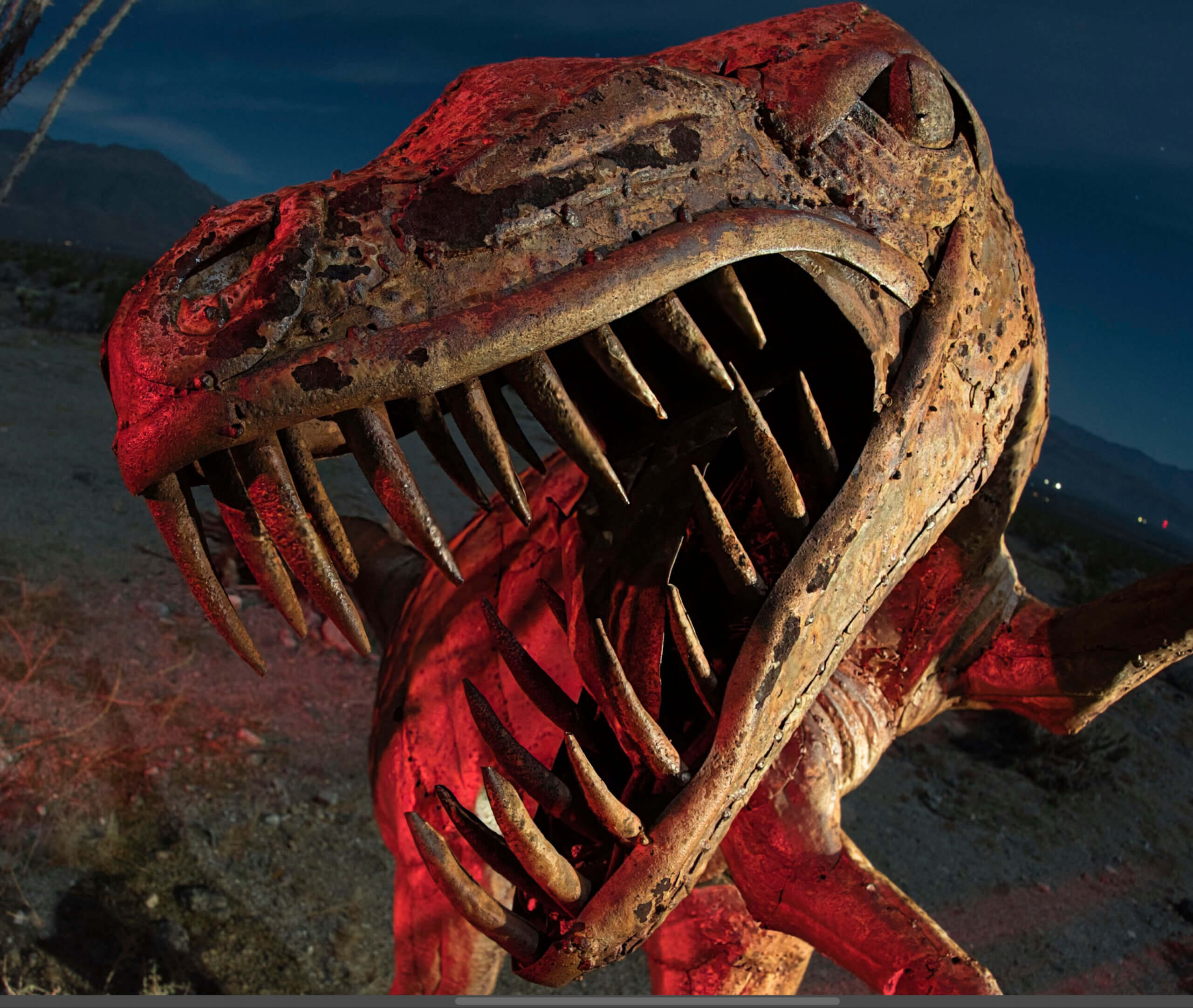
Sharpening software companies frequently like to advertise how great they work with birds. And with the feathery plumes and eyes, it does give a lot for sharpening software to sense. But I was wondering how it would work with night photos where part of the image was out of focus. I did two comparisons: one with a sculpture of a velociraptor in Borrego Springs, CA, and another with an old photo of Mobius Arch in Alabama Hills, CA.

I used only RAW files for each of the two comparisons. However, both programs are capable of sharpening TIFF or JPG files.

For our attempt at comparison, I used Topaz Labs Photo AI 2.4.2, which is the second version of Photo AI, and Luminar Neo 1.18.3, which had been just updated prior to writing this article. I didn’t intend this to be a comparison. I was going to simply kick the tires with Photo AI. But, well, things happen. Right as I got ready to submit this article, Topaz released Photo AI 3. However, all comparisons are still valid.

At the end of this article, I will share some brief thoughts about the ethical nature of using AI sharpening software for certain genres of photography, such as photojournalism.

Using Topaz Photo AI V2: Velociraptor sculpture

I first began with a velociraptor sculpture photo. I focused on the eye, and because I was so close to the sculpture, this left the snout a little out of focus.

Sharpening a sculpture using Topaz Photo AI V2.
Sharpening a sculpture using Topaz Photo AI V2. Autopilot began sensing what to do immediately.

Topaz Photo AI began using Autopilot to sense what the photo needed.

Sharpening a sculpture using Topaz Photo AI V2. This was the default setting from Autopilot.

I went with the default setting from Autopilot because it looked good, and it was a reasonably medium setting. The default was Standard with a setting of Strength of 57 and Minor Deblur of 16.

Sharpening a sculpture using Topaz Photo AI V2. Mask.
Sharpening a sculpture using Topaz Photo AI V2. The mask was done automatically by Photo AI.

Impressively, when I went to create a mask so I would only sharpen the sculpture, it was already done. This is great. If you are going to advertise that you are going to make things easier for photographers, this is the way to do it.

Luminar Neo: Velociraptor sculpture

Next up? Luminar Neo, using Supersharp.

Sharpening a sculpture using Luminar NEO SuperSharp. Mask.
Sharpening a sculpture using Luminar Neo Supersharp. This was the closest I could get with their Mask AI feature. I ended up using a brush to add on to their mask. In other words, Topaz Photo AI did a better job automatically sensing the mask, and even did so automatically.

Upon loading, I selected Supersharp, as it didn’t load this automatically a la some sort of Autopilot as Photo AI does.

Luminar Neo does not have a slider. I selected the medium strength for sharpening because I felt it would be closest to Photo AI. It put on a display of patterns moving back and forth, which at least tells you that it’s working on something. It takes a while for this to process, but once it does, everything works swiftly.

The Mask AI feature offered some choices, none of them, not surprisingly, a dinosaur. “Architecture” was the closest. I then used a brush to add to the rest of the mask so I would only sharpen the sculpture and nothing else.

Sharpening examples: Topaz Photo AI or Luminar Neo Supersharp — Velociraptor sculpture

Topaz Photo AI after sharpening: Velociraptor sculpture

Screenshot of sharpened image, Topaz Photo AI (Standard at a Strength of 57 and Minor Deblur of 16 from a RAW file.
Screenshot of sharpened image, Topaz Photo AI (Standard at a Strength of 57 and Minor Deblur of 16 from a RAW file).

Full size of the above image.

Luminar Neo Supersharp after sharpening: Velociraptor sculpture

Screenshot of sharpened image, Luminar NEO Medium SuperSharp from a RAW file.
Screenshot of sharpened image, Luminar NEO Medium Supersharp from a RAW file.

Full size of the above image.

RAW file with no sharpening: Velociraptor sculpture

Screenshot of RAW file, unsharpened.

Full size of the above image.

Results: Topaz Photo AI vs. Luminar Neo Supersharp — Velociraptor sculpture

Bearing in mind that I was using as close to medium settings as I could possibly get them, I would say that Topaz Photo AI gets the nod here, if for no other reason than it did it automatically, and made it as easy as it could possibly be to sharpen this. It actually did all the processing via Autopilot quicker than Luminar Neo did after selecting Supersharp. Also, the image was slightly sharper.

I am quite sure that if I fiddled with Luminar Neo Supersharp, I could get to address the blur as well as Photo AI. Perhaps simply using the strong selection might do it. But here, see for yourself. This time, I will also have high-resolution screenshots for you to look at as well in the hopes that you can decide for yourself.

Hey, one more comparison!

It’s very important to realize that sharpening software has different strengths and abilities. With that in mind, I thought I would try a single-exposure Milky Way photo from summer 2017.

The stars are beautifully sharp in this photo. The problem is that Mobius Arch is not. Why? I was a little too close to the arch for it to be regarded as “infinity” by the lens. Consequently, it’s a little blurry. It’s very challenging to determine whether something like this is perfectly in focus in the field. It’s dark, after all. But what I should have done was to examine it more carefully on my cameras LED screen. I could have then taken a second photo while focused on the arch, and blended them together.

Would either of these programs be able to rescue my mistake?

Using Topaz Photo AI V2: Mobius Arch

Topaz Photo AI. Sharpening at a medium setting, Strength of 50, Minor Denoise of 50.

For this next comparison, I wanted to do two attempts at sharpening. For the first one, I selected “Standard,” also selecting a Strength of 50 and a Minor Denoise of 50. This would be the generally moderate setting, just to see how it would do. One of the aspects of AI photo processing that critics frequently overlook is the ability, just like with many other programs, of selecting the setting you want instead of going with an automatic setting.

Topaz Photo AI. This is the mask it automatically selected, getting most of the arch.

Like before, Photo AI automatically selected a mask, this time automatically choosing “Subject.” It got most of Mobius Arch, as you can see.

Topaz Photo AI. Sharpening at a strong setting, Strength of 100.

As mentioned, I made two attempts at sharpening. This one was maxed out, using the Strong setting, and at a Strength of 100. We shall soon compare them to Luminar Neo’s attempts.

Using Luminar Neo: Mobius Arch

Luminar NEO Supersharp, selecting “High” for the setting.

I selected two settings, just as I did with Photo AI. Here, the choices given were Medium and High. Since there are no sharpening adjustments other than that, I just went with it. Of course, I also tested its ability to mask easily.

Luminar NEO Supersharp. This is the mask it selected after selecting “Mountains”.

Unlike Photo AI, you have to select a Mask unless you want it to sharpen the entire image. After clicking on “Mask AI”, Luminar Neo offered two settings, “Mountains and “Natural Ground”. “Mountains” worked better.

Sharpening examples: Topaz Photo AI or Luminar NEO Supersharp — Mobius Arch

Topaz Photo AI after sharpening: Mobius Arch

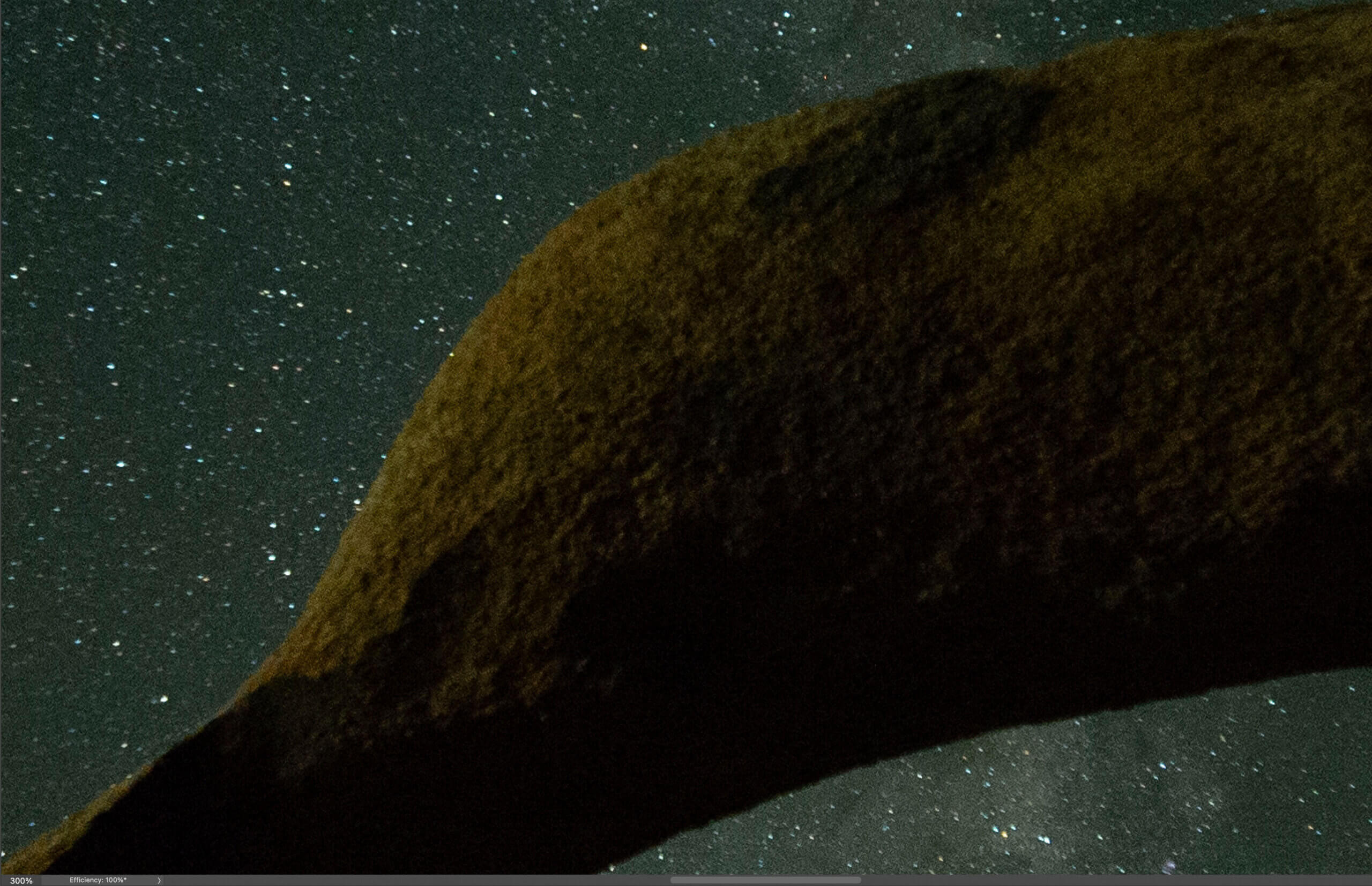
Screenshot of sharpened image, Topaz Photo AI (Standard at a Strength of 50 and Minor Deblur of 50 from a RAW file).

Full size of the above image.

Screenshot of sharpened image, Topaz Photo AI (Strong at a Strength of 100 from a RAW file).

Full size of the above image.

Luminar Neo Supersharp after sharpening: Velociraptor sculpture

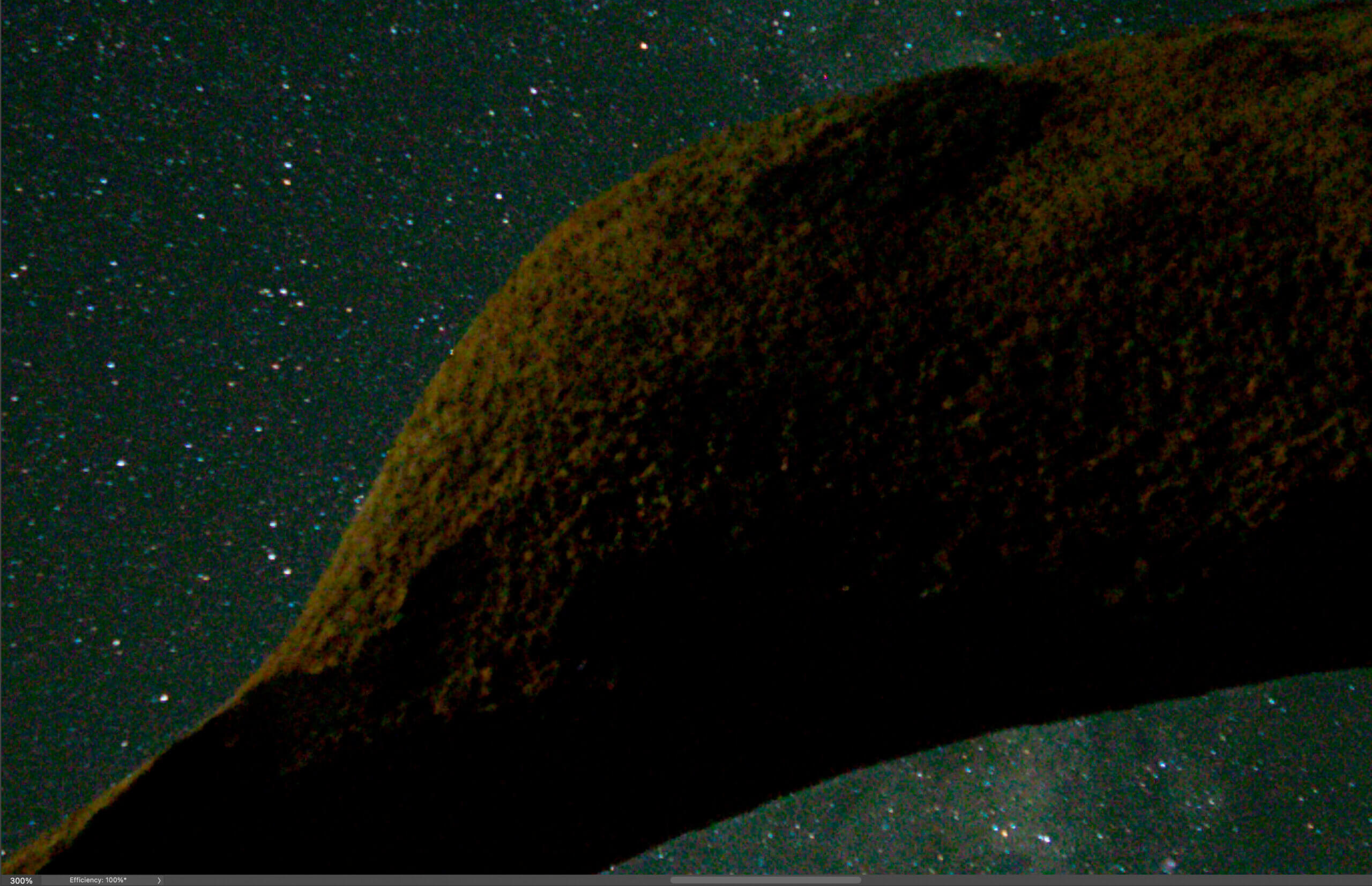
Screenshot of sharpened image, Luminar NEO Medium SuperSharp from a RAW file. 300% magnification.
Screenshot of sharpened image, Luminar NEO Medium Supersharp from a RAW file. 300% magnification.

Full size of the above image.

To try to compare photos to the sharpened ones from Photo AI, I made two different images, one sharpened on a medium setting (above), and one on a high setting (below).

Screenshot of sharpened image, Luminar NEO High SuperSharp from a RAW file. 300% magnification.
Screenshot of sharpened image, Luminar Neo High Supersharp from a RAW file. 300% magnification.

Full size of the above image.

RAW file with no sharpening: Velociraptor sculpture

Screenshot of RAW file, unsharpened. 300% magnification.

Full size of the above image.

Results: Topaz Photo AI vs. Luminar Neo Supersharp — Mobius Arch

Here, the results were a little different from the dinosaur sculpture.

Comparisons of the medium sharpening settings: Topaz Photo AI vs. Luminar Neo Supersharp

At the medium settings, Photo AI produced sharper settings while still not having artifacts. However, it also made the sky much darker. This is particularly curious since I had masked the arch so I would only sharpen that.

Comparisons of the strong sharpening settings: Topaz Photo AI vs. Luminar Neo Superharp

At the strong settings, Photo AI produced more detail without too many artifacts. Like the medium settings, it made the sky much darker. And this again with the same mask.

As mentioned before, Photo AI was considerably quicker at processing everything via Autopilot automatically upon loading. This includes applying denoising, and it also includes the mask for sharpening. If you like denoising and sharpening applied easily, Photo AI is pretty great. Luminar Neo, on the other hand, requires that you select SuperSharp, then takes a longer time after you select the amount of sharpening. Then if you want to apply an automatic mask, this also require more processing time. It’s a much slower process.

As you can see, depending on the type of photo and the subject, the results can be very different. If I just do one kind of photo, one software might consistently excel over the other. But when you select different kinds of photos, the choice is not so clear.

Topaz Photo AI 3.0 is here

As I was getting ready to submit this article, Topaz released Photo AI 3.0. 3.0’s new features include presets, flexible ordering of enhancements, panel docking & collapsing, enabling RAW color and lighting adjustments, and more. This new version includes the ability to adjust the color balance and lighting for RAW files as well as denoising. The presets allow you to create various filter combinations and settings. You now can reorder and combine enhancements in any order. But, as previously mentioned, the discussion and comparisons in this article (and the previous Photo AI V2 articles) are still relevant.

Is it ethical to use AI sharpening in genres such as photojournalism?

If you compare the sharpening in general to the RAW files, you’ll notice that the details aren’t identical. And you’ll notice that the details aren’t identical between each sharpening software either. The sharpening software with each of these programs is essentially making an educated guess, based on machine learning, as to what should go there. This approach is considerably more obvious with the Mobius Arch photo, which is why I chose this photo to share with you. There’s more “interpretation” with the texture of the rocks than there is with the better-defined sculpture of the dinosaur.

This raises potentially interesting questions. For instance, should a photojournalist take a photo for a magazine or newspaper, process it with an AI-based sharpening software program, and submit it to news agencies? Is it okay if the software has not changed the texture of the photo? While it certainly is vastly different compared to, say, using generative fill to add elements that were not there, is it still ethical?

When I had my photo in National Geographic Books, I had to submit my RAW file so they could verify that it was indeed a real photo. But not everyone has time to do this, and not everyone has time to pixel-peep all their photos when there are deadlines.

I use AI-based sharpening software, and it rarely changes the texture in a photo. But that’s because almost all my photos are already very sharp and well-defined. Here, though, the Mobius Arch photo is blurry enough that AI sharpening has altered the texture a bit. It’s not enough to get me to stop using it, but I do wonder about how this affects certain genres of photography. Also, I would also think that for photos expressly used for scientific research, you wouldn’t be able to use software like this at all.

Regardless, while it’s hardly perfect, sharpening software already works quite well. And the amazing part is that this technology is still in its infancy. As machine learning progresses, we will see incredible advances in this technology in the coming years.

What is your opinion on using AI sharpening software for genres such as photojournalism? What is your opinions on how well Topaz Photo AI V2 or Luminar Neo SuperSharp sharpen photos right now? Please leave your opinions in the comments!

Brazilian photographer Sebastiao Salgado is known in particular for his work in the Amazon

Brazilian photographer Sebastiao Salgado is known in particular for his work in the Amazon

Keep it Clean. Please avoid obscene, vulgar, lewd,
racist or sexually-oriented language.
PLEASE TURN OFF YOUR CAPS LOCK.
Don’t Threaten. Threats of harming another
person will not be tolerated.
Be Truthful. Don’t knowingly lie about anyone
or anything.
Be Nice. No racism, sexism or any sort of -ism
that is degrading to another person.
Be Proactive. Use the ‘Report’ link on
each comment to let us know of abusive posts.
Share with Us. We’d love to hear eyewitness
accounts, the history behind an article.

Intimate Photos of Kurt Cobain and Courtney Love’s Family in the 90s

Intimate Photos of Kurt Cobain and Courtney Love’s Family in the 90s
Black and white image of Courtney Love and Kurt Cobain

This post may contain affiliate links. If you make a purchase, My Modern Met may earn an affiliate commission. Please read our disclosure for more info.

In the 30 years that have passed since Kurt Cobain’s death, the myth around him has only grown. Regarded as a genius musician and a misunderstood artist, many forget about the real man behind the success of Nirvana. One of the most revealing displays of this was a 1992 photoshoot by husband-and-wife photography duo Russell Peacock and Constance Hansen—together known as Guzman—who captured Cobain, his wife Courtney Love, and their daughter, Frances Bean, in the intimacy of their home. Now, powerHouse Books will publish a new book featuring never-before-seen images from this shoot.

In 1992, Kurt Cobain and Courtney Love were at the height of their fame. They were the leads in two of the biggest rock bands in the world; he was in Nirvana, while she was in Hole. Hoping to share a different, more domestic side to them, Spin magazine tasked Guzman with shooting a cover story. And so, the couple made their way to the musicians’ home in Hollywood.

However, the shoot didn’t go according to plan. The hair and make-up team were asked to leave for bringing up the negative press, and Cobain just wouldn’t get ready or leave the bed. Rather than call it off, the photographers made their way to the bedroom, and took the images there. The photographers later admitted this was what they were hoping for. By capturing them in their pajamas while playing with their daughter, they showed an opposite perspective to the rockstar lifestyle they both led.

Five images taken that day were published in the December edition of Spin, which celebrated the year in music. The now-iconic cover sees Cobain in bed, carrying his daughter in one arm while Love rests on his other shoulder. The story was titled “Family Values”—a name shared with the new photography book that will include all 90 images from the shoot; as well as two essays from Michael Azerrad, author of Come As You Are: The Story of Nirvana and a friend of Cobain; and Guzman, who tells the story behind these images.

“Kurt Cobain and Courtney Love picked a heck of a time to have a baby,” writes Azerrad. “Their daughter Frances was born on August 18th, 1992, the day before the 1992 Republican National Convention’s ‘family values night.’ The Republican Party was hell-bent on denouncing heathen libertines, a.k.a. Democrats, and so ‘family values,’ wrote The New York Times columnist William Safire, became ‘the G.O.P.’s political attack phrase.’”

But the conclusion hits closer to home. “There are many good ways to be a family,” reflects the author. “In 1992, that was a difficult thing for some people to get their heads around, and it still is. But, as these very moving photographs demonstrate, there is only one true family value, and that is love.”

Family Values: Kurt, Courtney & Frances Bean comes out June 4, 2024. You can preorder a copy on Bookshop and Amazon.

PowerHouse Books will publish a new book featuring never-before-seen images of Kurt Cobain and Courtney Love’s family life.

Kurt Cobain, Courtney Love, and daughter Frances Bean

Kurt Cobain, Courtney Love, and daughter Frances Bean

The 1992 images were taken by husband-and-wife photography duo Guzman, who captured Cobain, Love, and their daughter, Frances Bean, in the intimacy of their home.

Black and White image of Kurt Cobain holding daughter Frances Bean next to Courtney Love

Black and White image of Kurt Cobain holding daughter Frances Bean next to Courtney Love

Five images taken that day were published in the December edition of Spin, but the new book will feature all 90 of them.

Black and White image of Kurt Cobain

Black and White image of Kurt Cobain

By capturing Cobain and Love in their pajamas while playing with their daughter, Guzman showed an opposite perspective to the rockstar lifestyle they both led.

Courtney Love and daughter Frances Bean

Courtney Love and daughter Frances Bean

Black and white image of Courtney Love

Black and white image of Courtney Love

Kurt Cobain, Courtney Love, and daughter Frances Bean in bed

Kurt Cobain, Courtney Love, and daughter Frances Bean in bed

powerHouse Books: Website

My Modern Met granted permission to feature photos by powerHouse Books.

Related Articles:

Book Reveals Hundreds of Frida Kahlo’s Fascinating Personal Photography Collection

Paul McCartney’s Photos Documenting The Beatles’ Rise to Stardom Coming to the Brooklyn Museum

Photography Collective Highlights Washington State’s Beautiful Vistas in New Book

Artist Paints Blue Portraits To Celebrate the Legacy of Hispanic Artists and Pop Culture Legends

Still Photography is Focus of New May AC

Still Photography is Focus of New May AC

Our May 2024 issue of American Cinematographer presents a special focus on ASC members’ still photography; coverage of the nominees for the inaugural ASC Music Video Award; a photographic recap of the 38th Annual ASC Awards; and a look at the art of on-set still photography.

image
On Our Cover: Bike (2023), depicts “reflections at dawn on the Gulf of Mexico,” says the photographer, Mark Vargo, ASC.

Inside:

President’s Desk: ASC President Shelly Johnson discusses ways in which still photography has informed his work ethic and instincts.

AC presents three galleries of Society members’ still photography: People, Places and Still Life.

image

image
image

Cinematographers Jon Joffin, ASC; Scott Cunningham, ASC; and Andrey Nikolaev discuss working on their ASC Award-nominated music videos: Jon Bryant’s “At Home” (Joffin), Little Simz’s “Gorilla” (Cunningham) and Cassie Marin’s “Tanto” (Nikolaev).

A photoessay celebrating the 38th Annual ASC Awards shines a light on a festive weekend.

Shot Craft: A look at the skills and approaches that help create good set photography, including examples and tips.

image
Autumn Durald Arkapaw, ASC plans a shot with actor Winston Duke on the set of Black Panther: Wakanda Forever (AC Dec. ’22).

Wrap Shot: Threshold, a still by Alice Brooks, ASC.

Our print and digital subscribers will be receiving this issue soon.

Not an AC subscriber yet? Do it today.

A Photographer in Search of Forgotten Burial Sites

A Photographer in Search of Forgotten Burial Sites
image

An African American burial ground project in South Carolina is just one subject in Caroline Gutman’s search for a history hiding in plain sight.

Times Insider explains who we are and what we do, and delivers behind-the-scenes insights into how our journalism comes together.

I first heard about the unmarked African American burial sites in Charleston, S.C., in November 2021, while visiting the city to research an entirely different topic: I was there to photograph the legacy of indigo in the United States and its role in slavery.

A historian there told me the location of a potter’s field in the middle of Charleston that held the remains of over 26,000 people, most of whom were Black. I was familiar with the site; seeking Wi-Fi during my research, I had visited a community center that now sits on the land. There were also two baseball diamonds, two parking lots, a playground and a college football stadium named after a Confederate officer.

But there was no memorial acknowledging the remains that existed underground.

On my way out of Charleston, I stopped at the site to photograph those ball fields and parking lots. I couldn’t stop thinking about the history they obscured. On my drive home to Philadelphia, I wondered what other unmarked African American burial grounds existed in the United States. I didn’t know it then, but I had started a photography project that continues today.

Across the country, African American burial grounds have been paved over by parking lots, performance halls and highways. Some have a marker; other sites have been erased or forgotten.

Thirty six graves of people of African descent were discovered during construction of the Gaillard Center in Charleston, S.C.Caroline Gutman for The New York Times
A historic map of Scanlonville includes the Scanlonville Cemetery, also known as Remley Point Cemetery.Caroline Gutman for The New York Times

My reporting first brought me to a strip mall in northeast Baltimore, where a Food Depot, Dollar General and Shoppers World sat on top of the remains of over 10,000 graves. The former site, Laurel Cemetery, was a prominent African American burial ground for over a century before it was closed in 1958. In Philadelphia, an African American burial site also known as the Bethel Burying Ground was in my old neighborhood. I learned of unmarked graves in Ellicott City, Md., and Washington, D.C. The more I asked, the more sites people told me about.

We are having trouble retrieving the article content.

Please enable JavaScript in your browser settings.


Thank you for your patience while we verify access. If you are in Reader mode please exit and log into your Times account, or subscribe for all of The Times.


Thank you for your patience while we verify access.

Already a subscriber? Log in.

Want all of The Times? Subscribe.