Photography

A Monitor Thoughtfully Designed for Photographers: We Review the BenQ

A Monitor Thoughtfully Designed for Photographers: We Review the BenQ

It’s no question that the technology available for creatives nowadays offer solutions for any kind of workflow challenges. However, it’s even more remarkable when you see that a particular tool was tailored specifically for the kind of usage that you require.

When we talk about displays for photo editing, of course the most important factors to consider are color accuracy and resolution. Photographers look for a monitor either as a secondary display or as a primary monitor for a desktop workstation that can be kept in a controlled lighting environment. The goal is to have a screen with high resolution and get colors that are as accurate as possible, especially for projects that have prints as the end goal. At the same time, it is important to acknowledge that a lot of the work that we do as photographers nowadays end up on digital platforms, and it is equally as important for us to proof our images for colors displayed by screens. Most manufacturers have options that often cater to a wider range of creatives with different workflows, but this also means that a lot of the features end up not being utilized. However, this monitor that was specifically designed for photographers aims to fit your workflow like a glove.

The BenQ SW272Q

[embedded content]

This BenQ SW272Q monitor comes as a 24 x 14.5-inch panel with a thickness of about 2 inches that tapers down to 1.5 inches towards the sides. It makes use of a hard plastic bezel that keeps the monitor relatively lightweight and easy to adjust. This bezel encases the 23.7 x 13-inch LED backlit IPS panel topped off by a remarkably matte textured finish that disperses any direct hard light that shines on it, emulating the surface of a matte fine art print.

On the back panel is a 100 x 100mm VESA mount that is compatible with the included stand as well as all other VESA mount stands and arms. Below the mounting port are the display input ports that include an HDMI port, DisplayPort, a USB-C port with Power Delivery, and a USB Type-B port for extended connection down to the monitor’s hub features. The USB-C port acts both as an input port display and data transfers, as well as a simultaneous power output port that allows the monitor to charge any device plugged in for up to 90 watts.

On the bottom surface are two USB-A ports, a 3.5mm auxiliary audio port, and an SD card reader slot that act as a built-in hub for additional inputs. When connected to a computer via USB-C, it also functions as the connection for the hub. However, when connected via HDMI or DP, it requires using a separate USB-B to USB-A cable that also came in the box.

The desk stand allows for an additional 14cm (5.5 inches) of height by simply pulling on the handle on the back panel. The neck of the stand also allows the monitor to tilt down 5 degrees, tilt up 20 degrees, and swivel 30 degrees to either side. At the same time, the monitor can be rotated 90 degrees into a vertical configuration perfect for maximizing the screen real estate for editing vertical photos or videos.

Resolution and Color

The SW272Q has a 2560 x 1440 resolution with a refresh rate of 60hz while the higher variant, the SW272U offers 4K. Both monitors are capable of displaying 8-bit color with the enhancement of FRC, which allows it to closely emulate what a 10-bit monitor can display. This IPS panel has a contrast ratio of 1000:1 with a maximum brightness of 300 nits.

This BenQ AqColor monitor covers 100% of sRGB, 99% of AdobeRGB, and 98% of the DCI-P3 color spaces. Prior to packing onto individual boxes, these monitors are tested and calibrated under both Calman and Pantone standards to test for their capability to display the highest color accuracy. In general, the BenQ SW272Q comes with a peak color accuracy/variance rating of Delta E<1.5 however, each individual monitor comes with its own color accuracy report and this particular unit is reported to have an average Delta E rating of 0.35 which is significantly high for most color accurate IPS panels. Upon personal calibration, what I can attest to is that I would get quite close to this average (roughly values of 0.4-0.8) and visually, I saw very minimal changes from the default upon calibration when done under controlled color temperature (daylight) lighting.

In addition to the color accuracy capability, BenQ offers a feature with this monitor called the Paper Color Sync, which allows the user to match and proof images while emulating certain printers and paper options to get as close as possible to the intended output.

The HotKey Puck G3

This IR connected wireless remote called the HotKey Puck G3 is also included in the package of the BenQ AqColor monitors such as the SW272Q. This circular controller has one dial with a built-in button, three customizable shortcut buttons, a back button, and an input switch button. This allows for quick access to the monitor’s settings without having to reach over to the buttons behind the monitor. Pressing the dial opens up the monitor’s system menu, the input switch quickly accesses the input options that can be switched by rotating the dial, and the three shortcut buttons can be assigned to different color modes for the display. In addition, an info button can be found on the side of the controller that gives a quick look into the monitor’s current settings. This controller can also be configured to be used with multiple BenQ monitors simultaneously, which can be configured to switch easily using the three-way switch on the opposite side of the info button.

Application and User Experience

It was absolutely remarkable to see that a monitor was made specifically for photographers, specifically for viewing and editing photographs and preparing them for either high quality printing or for digital viewing and use. The 2.5K resolution in my opinion hits the sweet spot for a 27-inch monitor when it comes to pixel density, however it is undoubtable that where would be an observable difference when using the 4K version.

Among all the features, the color accuracy on this display (judging both subjectively and objectively with the calibration reports) will have to be the biggest and perhaps the most under-rated feature. A max Delta E rating of <1.5 is already quite remarkable for any IPS display, but the actual average rating of 0.35 makes it even more impressive. For someone who calibrates his monitors regularly, it was astounding to see how it achieves visually similar output as the OLED screen on my laptop and even more so, barely any difference upon hardware calibration. This does not mean that the monitor does not need any calibration because actual light environments can vary significantly, but it is impressive to see how close it comes when the indoor lighting is ideal.

When it comes to all the ergonomic and convenience features, this monitor does give a very smooth user experience. From the ability to adjust and even rotate the screen, to the input options as well as the extended hub features on the bottom panel, the SW272Q offers a very straight forward experience, so the user can get right onto the task at hand. The single USB-C cable connectivity and charging is perhaps the most convenient of them all.

The added feature offered by the HotKey Puck G3 also add to the convenience in terms of having quick access to all the monitor settings and switching to different inputs without much effort. However, I believe that this remote control tool has so much more potential as an editing tool. Given the dial and the buttons already on the device, it might be safe to assume that it can also probably double as an editing controller that can be configured for in-app hotkeys and shortcuts specifically on editing software like Photoshop and Lightroom. Perhaps with the flick of a switch it can shift from being a control for the monitor itself into a shortcut tool that can be configured with a driver. While the HotKey Puck G3 was definitely useful, I found that I personally under utilized it. Giving it this functionality will definitely give the user an even more efficient experience and definitely more value for money.

What I Liked

  • Wide color space coverage
  • Extremely high color accuracy
  • Convenient hardware features
  • Removable editing hood

What Can Be Improved

  • Possibly another USB-C port on the hub
  • Expand the HotKey Puck functions for editing

Conclusion

You can purchase the BenQ SW272Q here.

Capture your favorite memories with Queen Creek-based photographer Amy Harrison

Capture your favorite memories with Queen Creek-based photographer Amy Harrison

Lifestyle photographer Amy Harrison focuses on capturing the feelings happening behind the lens. Originally from the Bay area in California, Harrison grew up always being drawn to nature and art. In 2014 she made the move to Arizona and now calls Queen Creek home.

As a kid Harrison was always painting and drawing, but photography was always something that had interested her. She was that friend that would always take the best photos for everyone’s social media accounts. It was one of her friends that pushed her to pursue photography.

“It took a lot for me to take the leap and financially invest in myself,” said Harrison, owner of Emotion Photography. “I finally decided to invest in the equipment and then I just started and it’s been amazing. I feel like the artist part of me got unlocked again.”

It was the summer of 2022 when she first started buying gear and learning the ins and outs of her camera. In October of 2022 she started doing photo sessions. 

Shooting everything from maternity to senior pictures, weddings to family portraits, branding shoots and more, Harrison encourages people to reach out to her for whatever event they may need covered. She’s open to anything!

“I really feel like our relationships are the most important thing that we have in this life and I think that’s why it’s magnified when there’s people together that love each other… trying to capture that and bring that feeling out in a photograph is what brings me so much passion,” Harrison said. “It’s capturing the way his hand is in her hair or the way she’s holding her face. The way they’re kissing, the way a mother is holding their baby or the way this beautiful person is just looking off… it’s just capturing these little snippets of them and their interactions that highlight the depth of a relationship.” 

Instead of focusing on getting that perfectly posed photograph, her goal is to capture you. With the belief that everyone has a beauty to them, Harrison’s goal is to allow that to shine through in her work. 

“It’s almost like I’m just documenting you being you, you being with your favorite people, you having fun at the lake or whatever it is that we’re at… it’s more so that I’m documenting what’s taking place versus a posed, frozen, perfectly in place photo,” Harrison said. “It’s capturing the little special moments that happen as people are interacting.”

Having put her artistic roots aside for a while due to other priorities, Harrison’s happy to get back into creating. It’s given her a chance to reawaken that creative part of her that had become dormant. 

Looking ahead to her short-term goals, Harrison wants to master her craft and continue to build her business. Long-term, she’d love to become a destination elopement photographer. 

This job allows her to be a part of all of these magical moments people share. She wants her subjects to feel comfortable enough around her so they can be themselves as if the camera isn’t there. That’s when the photos with the most emotion come out. 

“It’s these happy and beautiful moments, things that they want to cherish forever that I get to be a part of by capturing those memories for them,” Harrison said.

To see some of Harrison’s work with Emotion Photography or to book a photo shoot, visit emotionphotography.org. She can also be reached on her Instagram and Facebook.

The Course of Events: A Journey Through the Lens of Street Photography

The Course of Events: A Journey Through the Lens of Street Photography

The Course of Events: A Journey Through the Lens of Street Photography

The Course of Events, a compelling exhibition held at the Fundació Foto Colectania, presents a powerful gaze into the evolution of Spanish and Portuguese societies since the mid-20th century. Displaying 160 select works from a collection of 3,000, the exhibition is a testament to the narrative potency of street photography and the critical socio-cultural dialogues it can foster.

The Collection and Its Architects

The collection, painstakingly amassed over time, comprises works by 80 authors, including the archive of Francisco Gómez, a celebrated name in the realm of photography. Distinguished photographers like Joan Colom, renowned for his vivid portrayal of Barcelona’s Chinese neighborhood, find their place alongside others such as Leopoldo Pomés and Xavier Miserachs, known for their male voyeuristic bias. The exhibition serves as a platform for these varying perspectives to converge, thereby enabling a richer and more nuanced understanding of the societies they represent.

An Unconventional Lens

Under the curatorship of Carles Guerra, the exhibition endeavours to recontextualize street photography, emphasizing the importance of viewing it through the lens of the photographers themselves. This includes a gender perspective, an often overlooked aspect in the discourse surrounding the medium. The inclusion of such diverse perspectives not only enriches the narrative but also pushes the boundaries of conventional photographic representation.

Thematic Blocks and Dialogues

The exhibition is thoughtfully organized into eight thematic blocks, creating dialogues between different generations of photographers and fostering collective reflection on the medium. Featuring works by photographers such as Ricard Terré, Clemente Bernad, Adriana López Sanfeliu, Laia Abril, and others, the exhibition navigates through a wide array of themes, from urban planning and economic struggles to climate change. The exhibition does not merely reflect on the past but also critically engages with contemporary issues, making it a timely and relevant discourse.

The Course of Events is slated to travel to Miami in the fall, coinciding with the Art Bassel celebration. This move aims to disseminate Spanish photography on an international platform, further broadening the reach and impact of these powerful visual narratives.

Ukrainian Photographers Demand Removal of Russian Judge From World Press Photo Jury

Ukrainian Photographers Demand Removal of Russian Judge From World Press Photo Jury

World Press Photo

The Ukrainian Association of Professional Photographers (UAPP) is officially oppsing the inclusion of Russian photographer, Mary Gelman, called “Maria” in some publications, as part of the jury for the World Press Photo 2024 competition.

Fear of Bias on the Jury

“The Ukrainian Association of Professional Photographers opposes the participation of Russian Maria Gelman in the jury of the competition World Press Photo 2024,” the UAPP explains in the English-language version of its statement.

“The Ukrainian Association of Professional Photographers appeals to the competition management with an urgent demand to change the composition of the jury and exclude the representative of the Russian Federation from its ranks. UAPP considers Gelman’s participation to be illogical and may affect the objectivity of decision-making when evaluating the participants’ works. In addition, Russia’s unprovoked, aggressive, cruel and unjust war against Ukraine has been going on for the 10 years in a row, and we believe that the participation of the representative of the Russian Federation, Maria Gelman, raises a lot of ethical issues,” the association continues.

Ukrainian photographer Valentyn Kuzan, a member of the UAPP, has noted on Facebook that, based on his knowledge, Gelman has not actively reported on Russia’s military operations in Ukraine.

“Especially considering that she, to my knowledge, did not participate in reporting the horrors of this war. But if she would, unlikely it would give her the moral right to evaluate the works of Ukrainian authors,” Kuzan writes in a machine-translated version of his Facebook post.

Kuzan questions whether a Russian photographer should evaluate images of the war in Ukraine, especially when judging photos captured by a Ukrainian photographer.

While a documentary photographer, Gelman has no apparent history as a conflict or war photographer, so it is not evident that she would have cause to photograph Russia’s ongoing military aggression.

There are also some concerns about Gelman having reportedly traveled to Crimea after Russia’s annexation of the Ukrainian territory in 2014.

“Gelman’s photos from Yalta, the city in occupied Crimea, were published in the Russian-language outlet Bird in Flight. The article is from 2015, and according to Ukrainian law, foreigners were allowed to enter Crimea only through the checkpoints from the Ukrainian-controlled side of the administrative border with Russian-occupied Crimea. Gelman has not mentioned how she got to Yalta,” reports the Kyiv Independent.

In the World Press Photo 2023 contest, Ukrainian photographer Evgeniy Maloletka won the “Stories” photo series category in the European region for his photos showing the Russian siege on Mariupol, Ukraine. Some Ukrainian photographers question whether photos showing similar stories will be fairly judged in this year’s competition given Gelman’s participation.

Photojournalists in Ukraine face extreme dangers. According to the Committee to Protect Journalists (CPJ), there are 17 confirmed journalists who have been killed in the Russia-Ukraine war, including 15 with a confirmed motive.

This year’s contest entries have closed, and judging is underway. The regional winners will be announced on April 3rd. As of now, Gelman is among five judges for the European region, sitting alongside chair Anastasia Taylor-Lind (United Kingdom/Sweden), Andreas Trampe (Germany), Gilles Steinmann (Switzerland), and Mariama Attah (United Kingdom). Gelman is an acclaimed photographer and was previously awarded in the 2022 edition of the World Press Photo Contest.

The World Press Photo Foundation’s Stance

This is a complex situation, and some photographers in Ukraine and beyond are understandably extremely concerned about Russia’s influence over its citizens, so PetaPixel contacted the World Press Photo Foundation.

“Photographers and other civilians in Ukraine are facing a brutal situation due to Russia’s continuing attacks,” says Andrew Davies, the World Press Photo Foundation’s communications director. “We have total respect for the journalists who are documenting Russia’s war on Ukraine for the world to see, often doing so with great risks and difficulties. In 2023, images recording these atrocities were showcased to millions around the world through our exhibitions and online channels.”

As for jury selection, the process of selecting jurors is extensive.

“In each regional jury of the contest, we aim for a balance of different characteristics such as professional experience, gender, and approach to photography. Putting this independent jury together is a thorough and careful process, resulting in the selection of 31 experts (five jury members per region, plus a global jury chair),” Davies explains.

“Like all jury members, Gelman was chosen for her high degree of professionalism and expertise. Her work on vulnerability, repression, and the LGBTQ+ community in an increasingly hostile environment is touching, honest, and technically excellent. We trust her ability, as a person and photographer, to fulfill this role,” Davies tells PetaPixel.

“After graduating with a degree in sociology, Mary got involved in photography. She often explores themes such as identity, trauma, vulnerability, and resilience, and seeks to challenge stereotypes and prejudices. She also focuses on life and the ideology of alternative communities and different social groups facing discrimination. The most important part of her practice is diving deeper into the topics and interactions with people, where empathy, trust, and understanding are significant,” writes the World Press Photo Foundation on Gelman’s juror page.

While some international competitions, including many sporting events, have opted to prohibit people from competing under a Russian flag, few have outright excluded Russian citizens altogether. After all, the Russian people are not inherently responsible for the actions of the Russian government or the Russian military. The relationship between a country’s people and that nation’s actions on a global stage is obviously complicated. The World Press Photo Foundation does not exclude photographers from any country from its prestigious competition.

“At the same time, we ensure the jury has the information it needs to judge the work in the context it is produced. So the jury is given the photographer’s nationality, where they are based, information relating to how and why the story was made — such as the motivation to work on the project, the type of project (assignment/personal project), and funding of the project,” Davies says. “The story behind the photography is an important part of the judging criteria, as is accuracy.”

The judging deliberations and voting are kept private. Per the World Press Photo Foundation, “All proceedings and deliberations of each jury are conducted in confidence. Jurors are required to sign a non-disclosure agreement to ensure they do not reveal any details of the deliberations.”

Davies says each judge is “selected carefully” for their expertise and professionalism. “We are confident in the ability of all of them to judge fairly.”

“Every year, we trust jurors to judge topics they might feel a connection to (because of their nationality, etc.). This includes jurors from countries that are at war or have repressive governments,” says Davies.

For those concerned that this personal connection by a single judge could significantly impact the results, Davies expresses no such concern.

“Our judging process is also rigorous and tested. No jury member can block any entry from winning. The final decision about both regional and global winners is made by the global jury, which is composed of the regional jury chairs plus the global jury chair.”

Balancing Diversity of Perspective Against Concerns of Fairness

It is easy to understand the UAPP’s concerns. However, demanding an outright ban on a Russian photographer from judging the World Press Photo 2024 competition risks conflating Russian civilians with the actions of the Russian government. A Russian’s lack of public demonization of their government’s actions is not the same as outright approval. While some can reasonably consider someone’s silence or inaction as a tacit agreement, the situation is not so clear in a country with tightly controlled media and strict laws against dissent.

What is clear is that by including Gelman on the European jury for this year’s World Press Photo awards, the World Press Photo Foundation has opened itself to this controversy. However, it may be a conversation, however challenging, that needs to take place because photography and photojournalism are vital in the fight for justice and peace worldwide, and the role photographers from certain countries should serve remains unsettled.

Unlocking the Power of Photoshop Levels for Photography

Unlocking the Power of Photoshop Levels for Photography

Levels often seems like a boring old tool in photo-editing programs. Maybe you’d use it to quickly fine-tune contrast by dragging the left and right sliders inwards. But it’s good for much more than that.

In some ways, Levels is less powerful than Curves: its chief rival. Even so, a Levels tool tells you vital things about an image’s color at a glance. Having adjustable RGB histograms at your fingertips is a big plus.

Table of Contents

The Hidden Colors Of Levels

In Levels, you can view and adjust discrete red, green, and blue histograms. It’d be easy to think these histograms only represent the three primary RGB colors, but that’s untrue.

Yes, if you drag the right-hand sliders inwards, you’ll add red, green, or blue to an image via the respective channel. However, the left-hand sliders modify the opposing secondary color in each case.

Red, green and blue histograms also embody opposite secondary colors.

Thus, the left-hand sliders add cyan in the red channel, magenta in the green channel, and yellow in the blue channel. This is useful to visualize when correcting color, especially in photos that have no neutral tones to help you.

The individual color channels define black and white points, too. Any pixel fully saturated in red, green, and blue becomes pure white with no textural detail. Any pixel likewise saturated in cyan, magenta, and yellow becomes black.

Here are some other points to note about RGB histograms:

  • Pure cyan (0, 255, 255 *) is a blend of green and blue and contains no red.
  • Pure magenta (255, 0, 255) is a blend of red and blue and contains no green.
  • Pure yellow (255, 255, 0) is a blend of red and green and contains no blue.
  • Big gaps on either side of a red, green, or blue histogram can signify a color cast.

* RGB values.

Color Corrections Using Levels

There are several ways to correct color using Levels. Some are also possible in Curves. Below, you’ll find three such methods.

1. Simple Levels Eyedropper Method

You’ll see three eyedroppers in Levels and Curves tools. You’d use the outer two to set the image’s black and white points, though this isn’t often needed. It’s the middle eyedropper tool—the mid-tone eyedropper—that you can use to correct color.

One of the easiest ways to remove a color cast is to find a neutral gray area in the image (like concrete or dark clouds) and click on it using the dropper tool. You may need to do this a few times before you get a result you like.

This method is akin to a white balance adjustment. As such, it’s better performed at the raw processing stage if you have that chance. A problem arises when there are no neutral tones in the image, as is often the case in nature. You can feed a gray card into your photo shoots to make color correction easier.

In photos shot under mixed lighting (e.g., daylight and artificial), white balance corrections in general become more difficult. You’ll correct a cold hue in one part of an image, only to increase the orange hue elsewhere. Levels layer masks can help in that situation, enabling you to address specific areas.

A Delft vase shot under artificial lighting and corrected using a Levels middle eyedropper.

2. The Average Blur Method

This method also uses the middle eyedropper tool in Levels or Curves. It works well on images that have no obvious neutral tones to guide you. However, don’t use it on photos that are dominated by one color.

First, duplicate your background layer. In Photoshop, go to Filter>Blur>Average and click on it. Your duplicated layer will turn into one solid color, which represents the averaged hue of the whole image.

Open a Levels layer and, using the middle eyedropper tool, click on the single color of the duplicated layer. It will turn into a mid-gray. Delete the duplicated layer and merge the Levels layer with the background image.

Using average blur and Levels to remove a yellow color cast.

3. Individual Histogram Method

One way to get rid of color casts and improve the overall look of an image is to examine the separate red, green, and blue histograms in Levels. When there’s a strong color cast in a photo, it’ll show itself in a Levels histogram.

An example of the above is a photo that has a cold blue cast. That being the case, you should see an absence of blue histogram data to the left. You can remove the cold cast by moving the left slider inward to add yellow. Because yellow is a mixture of green and red, you’ll enrich those colors at the same time.

Removing a blue cast in an image by moving the left-hand slider to the right in the blue channel.

A color cast on the magenta-green axis is more likely to come from artificial lighting than daylight. Modern artificial lighting (i.e., fluorescent and LED) uses a correlated color temperature with this precise potential. The backlighting in your monitor is the same, making calibration and profiling all the more important.

It’s possible to improve pictures by adjusting contrast in all three RGB Levels channels one by one. However, this can also create color problems, so it’s not something you’d do religiously. Try it on photos containing a variety of hues.

Viewing the RGB histograms separately can help you make editing decisions and affirm your assessment of an image. Being aware of secondary colors in Levels helps.

Types of Levels Histograms

Aside from the individual red, green, and blue channels in Photoshop Levels, you also have the composite RGB histogram. As you’d expect, this is a blend of the three.

RGB Histogram vs Luminosity Histogram

The RGB histogram warns you about clipping in any or all of the three red, green, or blue colors. Clipping refers to overexposure or underexposure, which always causes a degree of detail loss. If at least one of the three RGB channels still holds data, some detail is still possible (that’s what highlight recovery tools depend on.)

A luminosity histogram represents the perceived brightness of an image. To account for human color sensitivity, green is weighted with 59% of a histogram’s luminosity, with red at 30% and blue at 11%. This histogram is also sometimes called a luminance histogram (e.g., in ACDSee software), which is technically imprecise.

You can see the 11%, 30% and 59% weighting of fully saturated blue, red and green in this Luminance Levels tool.

Photoshop only includes an RGB histogram in Levels. Other programs vary. A luminosity histogram won’t show highlight clipping unless all three channels are clipped. With monochrome images, the RGB histogram is identical to a luminosity histogram.

Luminosity histograms and RGB histograms are the same in black and white photos.

You can use Levels inside Photoshop whilst looking at the histogram window for extra info if you want. For instance, the Colors histogram would give extra live detail on any channels being clipped.

The Clipping Display

In Photoshop and other programs, a clipping display lets you see which areas of detail are being lost. To access it, hold down the Alt/Option key and move the right or left Levels sliders inwards. You’d usually stop once pixels begin to appear on either side.

There are times when Levels adjustments aren’t so easy. An example is when there are many pixels close to full saturation while the main subject sits stranded in the middle of the histogram. In such a case, the outer sliders will forfeit detail if moved. One solution is to adjust the mid-tones with the middle slider and limit your use of the outer sliders.

This highlights clipping display in Photoshop shows the brightest areas of a crocus image.

Highlight clipping is often more important than shadow clipping as it catches the eye. Even so, you wouldn’t usually want to block large areas of shadow (denoted by black pixels against a white clipping display.)

If a photo already has clipped Levels channels before you start editing, don’t go overboard trying to fix it. Doing so will often spoil the image, and the look of said image always trumps what the numbers and graphs tell you.

Making Sacrifices

It’s useful to note that some instances of clipping aren’t disastrous. For instance, no one expects to see detail in reflected sunlight (i.e., specular highlights.) You’ll need to make judgment calls about how much you can afford to sacrifice.

The size of an area being clipped is a vital factor, as it’ll certainly ruin a photo if you have large swathes of emptiness where detail once was. Color clipping (rather than luminance clipping) can also cause ugly posterization effects.

Shooting into the sun will often cause blown highlights. This isn’t necessarily a problem if it looks natural.

Game-Changing Possibilities?

You can now use content-aware fill and generative fill in Photoshop to help you patch up lost detail. This might affect how far you’re willing to go to prevent clipping, especially in a secondary area of the image.

Output Levels

Input Levels are most commonly used in Photoshop, but beneath those you have Output Levels sliders. Output Levels limit the tonal range of Input Levels, though by default they’re set to the same 0-255 span.

One nice use of output Levels is to achieve a more print-like feel to your online photos. Pull the left and right output sliders in to suppress highlights and shadows until you achieve a look you like.

The dynamic range of this black-and-white image has been reduced with Output Levels for a more print-like effect.

You can also pull in output sliders before the use of high-contrast LUTs or micro-contrast tools like Clarity. This helps to prevent clipping, albeit by reining in the result a little.

The use of Output Levels compresses the histogram, regardless of whether the image was originally clipped. What it can’t do is restore detail in formerly blown areas, alas.

The Levels Auto Options

An auto button is tempting in editing programs, especially if it gets you close to where you want to be. In Photoshop Levels, its effect varies depending on the algorithm selected under the Options tab. There are four in all.

Enhance Brightness and Contrast

Enhance Brightness and Contrast is the default selection, largely because it’s the smartest and most refined. One way it differs from the other three choices is by making intelligent tweaks with the mid-tone slider. It often clips individual RGB channels while avoiding luminance clipping. Image brightness is sometimes overcooked.

Find Dark and Light Colors

This choice with Snap Neutral Tones selected is the equivalent of Auto Color under the Photoshop Image tab. It was once the default setting and often gives a nice result. However, it clips your photo by the amounts specified under Target Colors and Clipping, so there’s no smart editing going on.

Enhance Per Channel Contrast

Enhance Per Channel Contrast is the equivalent of Auto Tone under the Photoshop Image tab. This option may create color casts as it routinely adjusts contrast in the discrete red, green, and blue channels. It works well when it works, making pictures pop with extra color contrast.

Enhance Monochromatic Contrast

This selection is akin to Auto Contrast under the Photoshop Image tab. It doesn’t dive into the distinct RGB channels. Rather, it sticks only to black-and-white contrast, like a Luminosity Levels adjustment. On the plus side, it won’t create color casts. You can also alter Target Colors and Clipping to minimize clipping.

The Enhance Brightness and Contrast auto option adjusts all three Input Levels sliders.

Wrapping Up

Simple tools like Levels or Curves might not be as magical as the latest AI-powered potions, but they still offer satisfying results. These are the tools you’re likely to use on every picture in some form. They can be used creatively, but at the very least they’ll imbue your photography with an underlying quality and understanding.

Lois Greenfield Moving Still is Chicken Soup for the Photographer

Lois Greenfield Moving Still is Chicken Soup for the Photographer

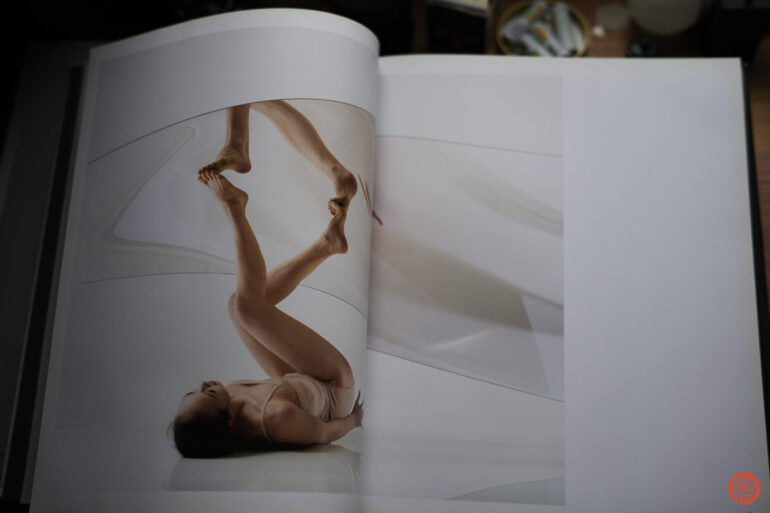
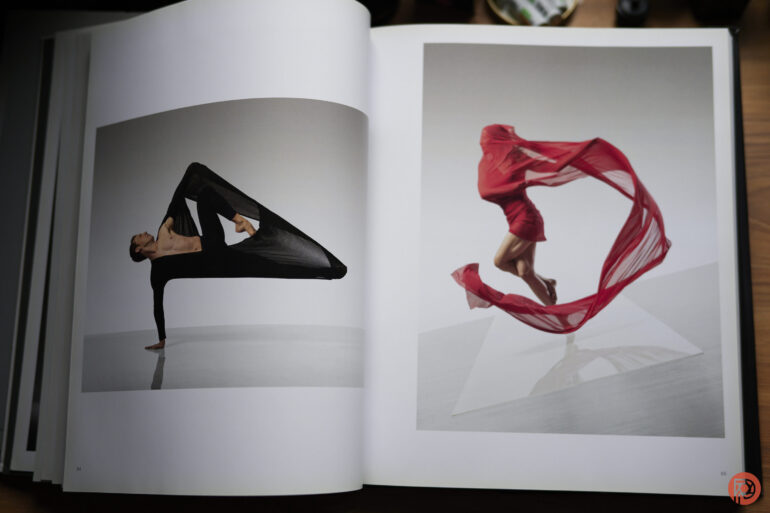
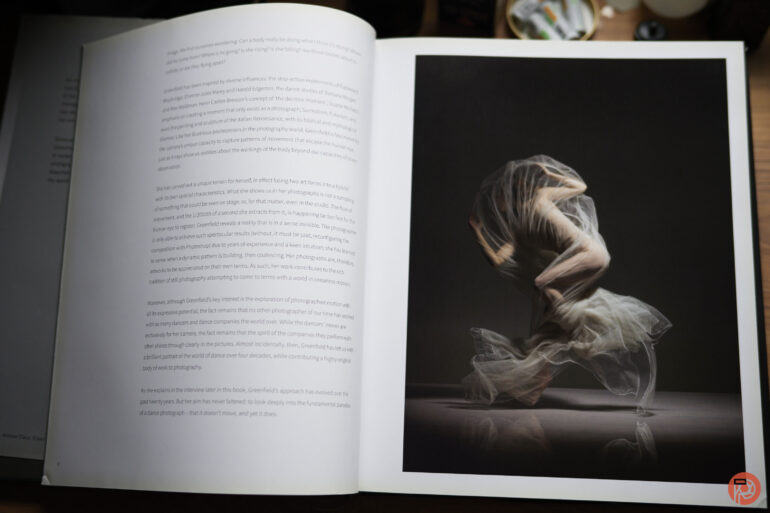
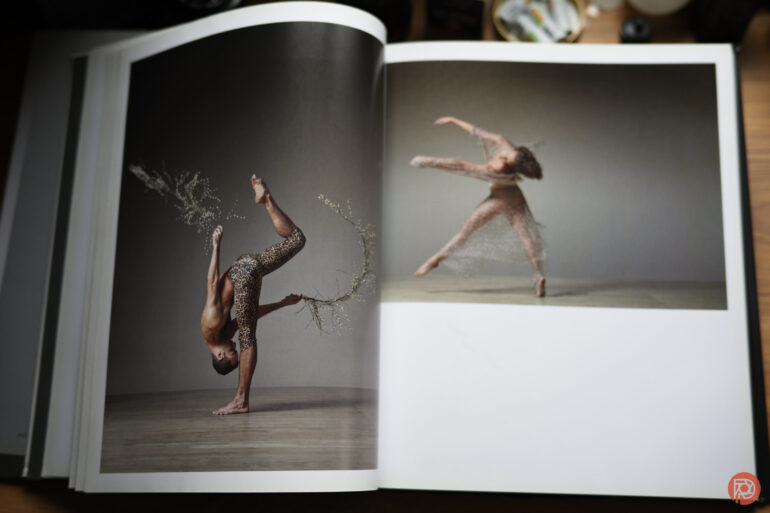
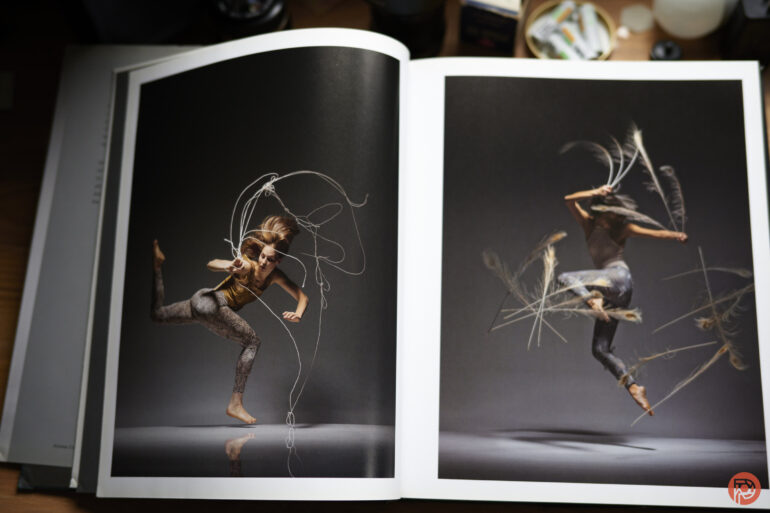
Years ago, I interviewed photographer Lois Greenfield for our Inside the Photographer’s Mind podcast. She gifted me her book, Moving Still. But it’s only recently that I got the chance to truly look through it. We’ve featured Lois a ton of times here on the site. Though now that I think about it, her work is some of the most perfect fodder for the creation of a photography book. Indeed, Lois Greenfield Moving Still takes her work and puts it into a way that you’ll want to page through and reference for inspiration. If you’re a dance photographer, this will really apply to you. But if you’re a studio photographer, you’ll totally understand where I’m coming from.

Lois Greenfield Moving Still is a book that’s vertical format. The images are printed on a mostly matte paper with only a little bit of sheen on them. Seriously, I wish more prints were made on paper like this. It suits itself to be very versatile and it looks good almost anywhere. But I thumbed through this book with diffused southern daylight coming from a window. I also slightly propped the book up to give it a bit more diffusion. As you turn the pages, you get an experience that the screen of your phone or computer can’t give you.

These are big images that have bold color, beautiful lighting, and pop in more ways than one. If it’s not Lois’s use of color, it has to do with the lighting, the background, etc. But most of all, the poses that the dancers are in are something that seem almost impossible to get. After talking with Lois, she told us that she gets the shots pretty much the way they are in-camera. Not to say that I don’t believe her, but Lois should be teaching lighting, color theory, and timing to all photographers today. She’s proof that you don’t need a camera that shoots at 120 frames a second. Many times, Lois can get the shot in a single frame — something that I’m aware is possible because I used to be able to do it when I had better vision.

Lois’s work is treated with the utmost respect as nearly every photograph has its own dedicated page. And in the rare cases that it doesn’t, the photography doesn’t feel like you should roll your eyes very hard. However, I’ll fully admit that they would look better centered onto a single page.

There are also various sections of the book that are more or less separated by things like the background, the lighting, the types of costumes worn, etc. Despite this, I’m constantly in awe of all of it.

Her photography is something that has to be very carefully done. It takes the street dance idea that so many other photographers abide by and grabs it by the shoulders while yelling at it to do the photographs properly. I remember Lois telling me that not much post-production, if any, is done on the photographs. This amazes me even more. And it’s bound to amaze any photographer that picks this book up.

Lois Greenfield Moving Still is a book for any photographer that wants to master lighting, adores paintings, likes dance photography, or just needs inspiration. It’s a reference tool for your aspirations which I think many photographers need to look at in a day where we’re devaluing the idea of a single photograph so much.


Rating: 4 out of 5.

We’re giving Lois Greenfield Moving Still four out of five stars. Want one? Check it out on Amazon.

Lois Greenfield Moving Still is Chicken Soup for the Soul of a Strobist
Lois Greenfield Moving Still is a book for any photographer that wants to master lighting, adores paintings, likes dance photography, or just needs inspiration. It’s a reference tool for your aspirations which I think many photographers need to look at in a day where we’re devaluing the idea of a single photograph so much.

PhotoSpot Debuts App for Enhanced Travel Photography Experiences

PhotoSpot Debuts App for Enhanced Travel Photography Experiences
image

NEW YORK, NEW YORK , UNITED STATES , January 17, 2024 /EINPresswire.com/ — PhotoSpot has officially launched its app, aiming to assist travelers and photographers in finding locations conducive to capturing engaging travel photos. Initially available in New York City, the app is now expanding to additional cities, broadening its scope and utility for a diverse range of users.

The app addresses a common challenge in travel photography: finding locations that offer compelling compositions. By guiding users to suitable locations, PhotoSpot facilitates the creation of visually appealing photographs, catering to both amateur and professional photographers.

Vaibhav Srivastava, the founder of PhotoSpot, explains the motivation behind the app: “We recognized a gap in the travel photography experience – the difficulty in finding the right composition for photos. PhotoSpot was developed to bridge this gap, making it easier for people to capture the essence of their travels in their photographs.”

The app goes beyond just suggesting locations. It integrates local knowledge, providing users with a rich, authentic experience. Over the coming year, PhotoSpot plans to extend its reach, identifying prime photography spots in various destinations. This expansion includes collaboration with local photographers, enhancing the authenticity and appeal of the locations suggested by the app.

Currently operational in New York City, PhotoSpot is on a trajectory to become a valuable tool for those seeking to enhance their travel photography skills in various urban landscapes.

For additional details, interviews, or inquiries, please reach out to Sabrena Gartland at sabrena@frogmanmediagroup.com.

Sabrena Gartland
Frogman Media Group
+1 310-427-7706
email us here

image

Long-time Sioux City photographer George Lindblade: Statute of limitations hasn’t yet run out on his best media stories

Long-time Sioux City photographer George Lindblade: Statute of limitations hasn’t yet run out on his best media stories

George Lindblade, long-time Sioux City media photographer and filmmaker, talks about the changes in the city’s media landscape. He declined to go on the record with his best stories, saying that most of the quintessential stories of Sioux City’s media are “X-rated or XXX-rated.”


Visuals Editor

#lee-rev-content { margin:0 -5px; }
#lee-rev-content h3 {
font-family: inherit!important;
font-weight: 700!important;
border-left: 8px solid var(–lee-blox-link-color);
text-indent: 7px;
font-size: 24px!important;
line-height: 24px;
}
#lee-rev-content .rc-provider {
font-family: inherit!important;
}
#lee-rev-content h4 {
line-height: 24px!important;
font-family: “serif-ds”,Times,”Times New Roman”,serif!important;
margin-top: 10px!important;
}
@media (max-width: 991px) {
#lee-rev-content h3 {
font-size: 18px!important;
line-height: 18px;
}
}

The Winners of the Nature Photography Contest Will Ignite Your Love for the World

The Winners of the Nature Photography Contest Will Ignite Your Love for the World

The Nature Photography Contest has just announced its inaugural list of winners. The new international photography competition is open to professional and amateur photographers from around the world.

Videos by Outdoors

The winners from each category receive cash prizes and the winner of Photographer of the Year will also choose a location to plant trees, one for every participant’s entry in the competition, in collaboration with One Tree Planted

Scroll below to see the winners of the 2023 Nature Photography Contest.

Photography Of The Year 

Sea Lion in Los Islotes – Glenn Ostle

nature-photography-contest
Sea Lion in Los Islotes by Glenn Ostle

“A sea lion stops to pose for the camera before diving through the large schools of fish that surround the islets of Los Islotes close to LaPaz, Mexico.”

Category Winners

Natural Landscape 

Marek Biegalski – Burning Flower 

Burning Flower by Marek Biegalski

“One of my favorite things when exploring Iceland is the incredible glacial river perspective seen from up high. They’re called ‘braided river’ systems, as they often resemble an intricate jumble of patterns, intertwining in an almost inexplicable fashion.”

Wildlife

Soumya Ranjan Bhattacharyya – Stories in the Sand

nature-photography-contest
Stories in the Sand by Soumya Ranjan Bhattacharyya

“The scorpion is widely distributed across various terrains in India. In Jaisalmer once the evening falls, the scorpions emerge across the dunes to feed for the night. I shot this image of the scorpion in the sand dunes at Jaisalmer. The scorpion, when lighted by faint UV light, emits bright blue luminescence from its body.”

Macrophotography

Adrian Truchta – The Dreamer – Philaeus chrysops.

nature-photography-contest
The Dreamer – Philaeus chrysops by Adrian Truchta

“Morning dew, sun, and a beautiful Philaeus chrysops female walking around her nest. Photo shot in a natural environment with natural light.”

Underwater

家 住 Tangle.

nature-photography-contest
家 住 Tangle

“Larval moray eel when feeling threatened”

Birds

Alessio Calviani- Puffin in Iceland.

Puffin in Iceland by Alessio Calviani

“Puffin walking on the cliff in Iceland”

Plant Life

Marcio Cabral – Pandora.

nature-photography-contest
Pandora by Marcio Cabral

“This panorama shows the beauty of Chapada dos Veadeiros, a Brazilian national park that hosts a rich biodiversity and breathtaking landscapes.”

Night World

Marc Marco – Los arcos y la cueva.

nature-photography-contest
Los arcos y la cueva by Marc Marco

“Panoramic night photograph in which I could capture the arch of the Milky Way passing behind the natural arch called Es Pontàs. In the photograph I could also capture a small cave in front of the arch.”

Environmental impact

Muhammad Hossain- Fatigue Sleep.

nature-photography-contest
Fatigue Sleep by Muhammad Hossain

“Many homeless people in Bangladesh have lost their homes and properties due to frequent floods, river erosion, and other natural calamities.” 

Sharing the Planet

Alain Schroeder- Saving Orangutans 01.

nature-photography-contest
Saving Orangutans 01 by Alain Schroeder

“Sibolangit, SOCP Quarantine Centre, North Sumatra, Indonesia. The whole SOCP team works together to prepare Brenda, an estimated 3-month-old female orangutan (she has no teeth yet), for surgery. A sedative is administered, the arm is shaved, her temperature is taken, while others hold her head or her hand out of compassion for the baby.”

Funny Nature

Panisara Sripratoom – Monday.

nature-photography-contest
Monday by Panisara Sripratoom

“A spotted owlet (Athene brama) emerging from a hollow within a yellow flame tree situated in the university campus. This species of owl is characterized by its small size, primarily nocturnal feeding behavior, and frequent occurrence in urban environments.” 

Photographer of the Year 

Maldives by Alain Schroeder (Photographer of the Year Winner)

The Photographer of the Year 2023 award went to Alain Schroeder. He was also the winner of the powerful orangutan image in the Sharing The Planet category. The judges shared that Alain’s photographs stood out for his “talent and versatility” and for his commitment to the environment. 

Learn more about adventure photography techniques. 

You can see more of the finalists on the Nature Photography Contest website. 

Winners of People Photo Award Embrace Diverse Beauty of Humanity

Winners of People Photo Award Embrace Diverse Beauty of Humanity
Street scene in Kolkata, India by Billy Dinh

“Our Everyday” by Billy Dinh. 1st Place.
“Everyday street scene captured in Kolkata, India in 2022.”

Street photographer Billy Dinh won The Independent Photographer‘s People Photography Award. His street scene taken in Kolkata, India, captured the attention of acclaimed photographer Michael Yamashita, who judged the competition. Yamashita, who has worked with National Geographic for over four decades, handpicked the 10 winners and finalists.

“This frame is compositionally strong and complex with wellorganized people placement centered around the yellow taxi and perfectly timed to capture a real street moment,” he says of Dinh’s winning photo.The eye moves around the frame, taking in the different layers, windows, shapes, colors, and expressions. It’s a good instant-read but leaves you wanting to spend more time with it. I love the man covered in soap and those toes. It begs the question and leaves you wondering, what’s going on here?”

The competition is one of 12 monthly awards that are handed out by The Independent Photographer. For the organization, the people theme is a way to explore diverse cultures and celebrate the multifaceted beauty of humanity. And this goal certainly shines through in all of the winners and finalists.

Bangladesh, Pakistan, North Korea, and Mongolia are just some of the countries represented in the winning photographs. The photographers honed in on everything from athletics to sacred rituals to traditional hunting and fishing practices. And in doing so, they are each helping the public understand a bit more about the world.

See more of the top images and finalists below, and if you’re up for it, try your own hand at one of The Independent Photographer’s contests. The January contest, Black & White, is now accepting entries until January 31, 2024, with the winner receiving a $1,000 cash prize.

See all the winners and finalists of The Independent Photographer’s People Photography Award.

Portrait of a young Mongolian eagle hunterPortrait of a young Mongolian eagle hunter

“Baka and his Eagle” by Diana Barthauer. 3rd Place.
“This is Baka, a young eagle hunter. Like most people living in rural Mongolia, the eagle hunters are nomads. To send their children to school, nomadic families keep a townhome, where they spend winters and then spend summer roaming the countryside. Many educated young Mongolians are moving to the cities in search of better job prospects. Baka, however, is an exception. When we were visiting his family, he proudly told us that he had dropped out of school and was planning to focus entirely on eagle hunting.”

Hindu devotees lit butter lamps and incense during Rakher Upobash festival in Narayanganj, BangladeshHindu devotees lit butter lamps and incense during Rakher Upobash festival in Narayanganj, Bangladesh

“Devotion” by Ashraful Arefin. 2nd Place.
“Hindu devotees lit butter lamps and incense during Rakher Upobash festival in Narayanganj, Bangladesh. Rakher Upobash, also known as Kartik Brata, is a sacred ritual observed by the Bengali Hindu community. It takes place on the last day of the Bengali month of Kartik, where devotees fast from dawn till dusk, offering prayers to Lord Krishna and seeking blessings for their families’ well-being.”

Portrait of the daughter of an Evenki reindeer herderPortrait of the daughter of an Evenki reindeer herder

“Daughter of an Evenki reindeer herder” by Natalya Saprunova. Finalist.
“All the values of the Evenki people are related to the reindeer: the nomadic lifestyle, their esoteric beliefs, household items, traditional clothes, cooking, and any number of sayings such as: “As long as the reindeer live, so do the Evenki people. The Evenki have a history of bartering fur from reindeer and hunted animals; the patterns of traditional Evenki costumes are inspired by nature.”

Sadhu praying next to a dogSadhu praying next to a dog

“Praying Sadhu” by Sergio Volani. Finalist.
“At dawn, in the Ghats along the Ganges River, sacred to Hindus, this sadhu recited his prayers while a dog watched in amazement.

Athletes practicing at the Taekwando Palace in PyongyangAthletes practicing at the Taekwando Palace in Pyongyang

“Taekwando” by Alain Schroeder. Finalist.
“At the Taekwando Palace in Pyongyang, a group of athletes simultaneously execute a tul, a series of offensive and defensive techniques against one or several virtual adversaries. In the foreground, stacks of tiles and (30 x 30 cm) pieces of wood that the athletes will break with their hands and feet in order to demonstrate kyok-pa, the art of breaking boards, bricks, and tiles.”

The winners were hand-selected by National Geographic photographer Michael Yamashita, who judged the contest.

Bajau jumping off a ship with a spear to fishBajau jumping off a ship with a spear to fish

“Salis” by Jacopo Della Valle. Finalist.
“The Bajau, also known as the sea gypsies, are indigenous seafaring people who live in the Southeast Asian seas. They are stateless people and live closely linked to the sea, in small wooden stilt houses built on shallow waters. Salis is a Bajau fisherman who took me to the seaside villages showing me their traditional way of life. Bajau are dedicated exclusively to fishing activities, up to 8 hours a day, and they go ashore only to trade their catch or seek shelter during storms.”

Five boys are holding their kite before a heavy rain in Hanoi, VietnamFive boys are holding their kite before a heavy rain in Hanoi, Vietnam

“Boys with flute kite” by Phong Nyugen. Finalist.
“After swimming in Bodhisattva pond, five boys are holding their kite before a heavy rain in Hanoi, Vietnam.”

Man working at brick kiln in PakistanMan working at brick kiln in Pakistan

“Working in Brick Klins” by F.dilek Yurdakul. Finalist.
“Brick Kilns in Southeast Asia are notable for causing environmental pollution, violating children’s rights, and working conditions that violate the most basic of human rights. Soot and harmful gases from the factory chimneys fill the air. Without respiratory masks, the polluted air finds its way straight to the lungs.”

Black and white image of a farmer in Pampallacta, PeruBlack and white image of a farmer in Pampallacta, Peru

“Cultural Reverence” by Thibault Gerbaldi. Finalist.
“Captured in Pampallacta, within a local farmer community, this photo immortalizes the alpaca blessing ceremony. I was deeply moved by the patriarch of the welcoming family, standing proudly in reference to his tradition, particularly during this ancient ritual. The black and white composition, I believe, enhances the timeless essence of these traditions, making the shot a timeless representation of cultural heritage.

The Independent Photographer: Website | Facebook | Instagram

My Modern Met granted permission to feature photos by The Independent Photographer.

Related Articles:

Heartwarming Winners of the 2023 Dog Photography Awards

Independent Photographer Magazine Awards Best Landscape Imagery

2023 Minimalist Photography Awards Celebrate the Beauty of Simplicity

Global Street Photography Contest Honors Photographers Capturing Slice-of-Life Snapshots