Luminar Neo Review

Luminar Neo Review

Generative artificial intelligence is a highly contested topic in the art world. On the one hand, there’s the technology that saves hours of editing on changes they would have been making manually anyway. On the other hand, many AI programs are based on images scraped from the internet without regard to copyright. Despite the controversy, many major software companies are integrating new features based on GAI. Luminar Neo is one of those programs. 

Neo is a newer program that is built around several AI tools with the goal of allowing photographers to spend more time behind the camera than behind the computer. This includes portrait edits like skin smoothing and teeth whitening with automatic masking, but it also includes special effects and even things like AI-suggested crops. I spent some time working with Luminar Neo to see precisely what the software can do — and if any ethical boundaries are crossed.

The Big Picture
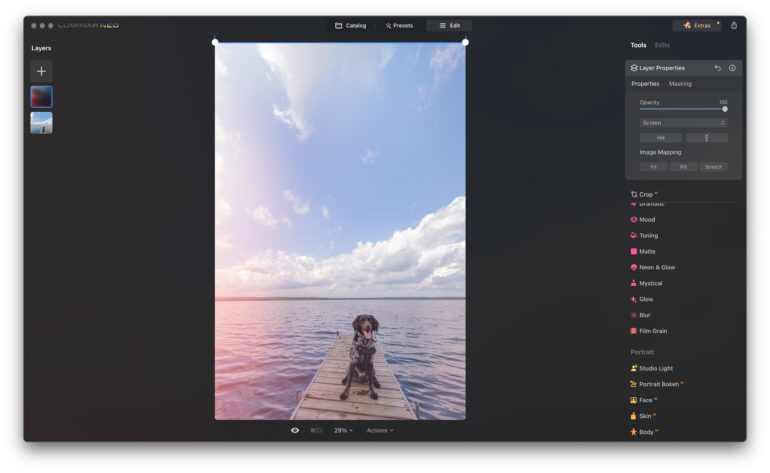
Luminar Neo is AI-streamlined editing software. The program puts time-consuming special effects and local edits at a level accessible for beginners and busy professionals on a time crunch. Its wide range of AI masking tools can be integrated into presets themselves, so one tap on the preset can add anything from teeth whitening in portraits to light rays on landscapes. And that’s all in addition to things like color and contrast adjustments. While the software includes basic tools like exposure, eraser, and color editing, its biggest draw is the special effects that are easy to apply, mask, and customize.

While the AI tools streamline many tasks, others are less so. Any portrait effects are applied to everyone in a group photo, for example, and manual masking is needed to individualize them. The AI-based skin defect removal didn’t work consistently across different skin tones. Some of the built-in presets also include body shape adjustments that not everyone wants or needs. It lacks the camera-specific RAW color profiles that come ready with other programs.

Luminar Neo has several excellent special effects and quick AI tools wrapped in a beginner-friendly platform. I would recommend it for beginners who don’t want to mess with time-consuming edits and as an add-on for quickly applying special effects. However, there are a few missing features and ethical gray areas that would prevent me personally from switching over. I’m giving Luminar Neo three out of five stars.


Rating: 3 out of 5.

Pros

  • Easy to use
  • AI speeds up several types of edits
  • Create your own presets that include local adjustments like teeth whitening and creative effects like sun rays
  • Built-in creative effects like light leaks and bokeh sparkles
  • Ability to customize with masks
  • Uncrop with GenExpand and smart erasing with GenErase

Cons

  • Portrait edits are applied to everyone in groups or couples’ photography
  • Skin defect removal doesn’t work on darker skin
  • GenSwap was seldom photorealistic
  • Several presets have built-in body adjustments (and not everyone wants or needs to be skinnier)
  • Raw photos are automatically developed when applying a non-RAW edit
  • GenSwap was difficult to get realistic results with
  • Export doesn’t have as many options, such as renaming or adding watermarks

Gear Used

I tested version 1.17.0 of Luminar Neo on a 2021 MacBook Pro with an M1 processor. The laptop is my own; the software was provided by Skylum for review purposes.

Innovations

There are a number of different image editing programs out there. Many of them now include some sort of AI-based technology. But Luminar AI leans heavily into AI with the goal of allowing photographers to spend less time on edits and allowing beginners to tackle traditionally challenging adjustments. The newest additions to Luminar Neo’s arsenal of tools are generative AI tools: GenErase, GenSwap, and GenExpand.

The new generative tools use Stable Diffusion but also incorporate other databases as well. “We’re using different diffusion models organized in a single pipeline that yields the best results achievable with today’s technologies,” said Dmytro Mykhalchuk, VP of Engineering & Product. “This means we are not limited to the use of Stable Diffusion alone, but SD possesses several very important attributes. First of all, the quality of the results is better compared to many other models. Second, it has a rapidly growing community, which is particularly important. This is because vendors such as Nvidia invest in optimizing their hardware and software specifically for the family of these models. This investment has made it possible for Skylum to collaborate with Nvidia and improve our performance by up to 25%.”

Stable Diffusion is one of the AI databases at the center of copyright lawsuits, as this database uses images scraped from the internet. Earlier this year, Getty brought a lawsuit against the AI model after it generated recognizable watermarks. While many visual artists feel that using copyrighted images to train software doesn’t fall under fair use, Stable Diffusion is a popular model used by other image editors, including Adobe Photoshop.

All three features are aided by in-software tips, such as trying to erase just one thing at a time. These generative tools also typically take a few minutes to run whereas other adjustments are better measured in seconds. It also requires an internet connection to run.

GenErase
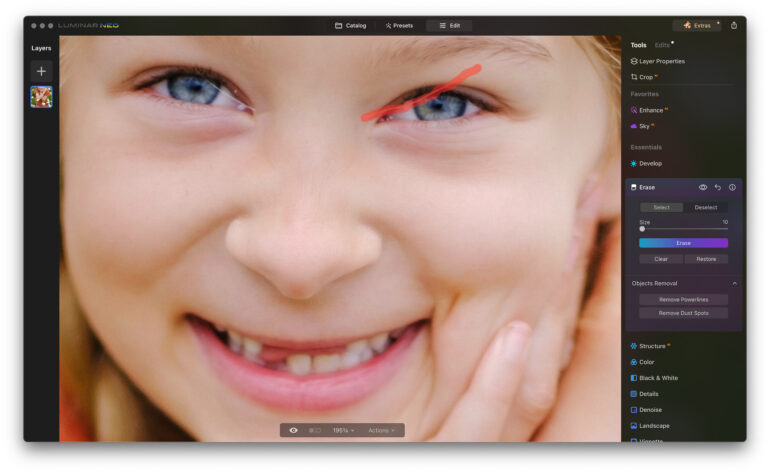
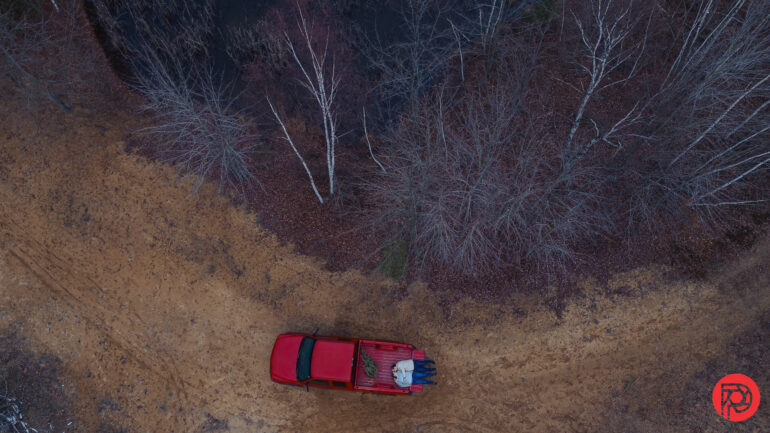
The GenErase tool is arguably the most usable option in the new feature list. It does a fairly good job of cleaning up an image. For example, it removed a jacket and light stand from a drone photo and acne from a portrait. However, it does work best when removing only one object at a time. That means for simple fixes like acne, a healing brush is typically faster since the GenErase takes a few minutes to run. The GenErase is the better option when you need to match a surrounding pattern or don’t have an exact replica to clone from somewhere else on the image.

GenExpand
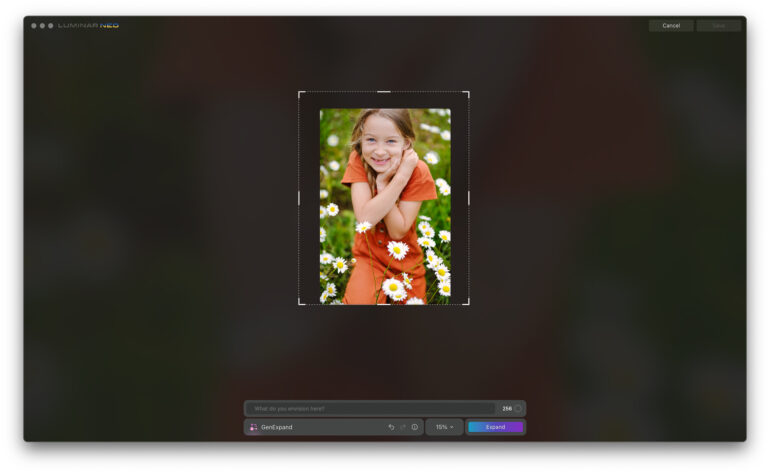
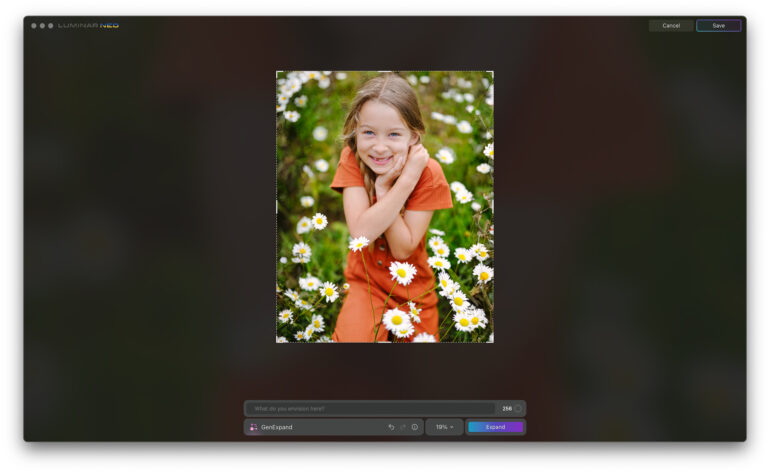
GenExpand essentially allows you to re-crop an image. Many photographers know the pain of wanting to print a specific size, only to realize the image doesn’t work with that aspect ratio. The tool is fairly simple — drag the sides to enlarge the image, then type in a prompt or leave it blank to generate based on the surroundings. 

It worked very well on a portrait with a natural background of a field of flowers. However, it didn’t recreate man-made objects well. For example, the results of attempting to expand on a photo of a boat and another of a dock produced poor results. Like the GenErase, it works best if you do one side of the image at a time rather than trying to add multiple sides at once.

GenSwap
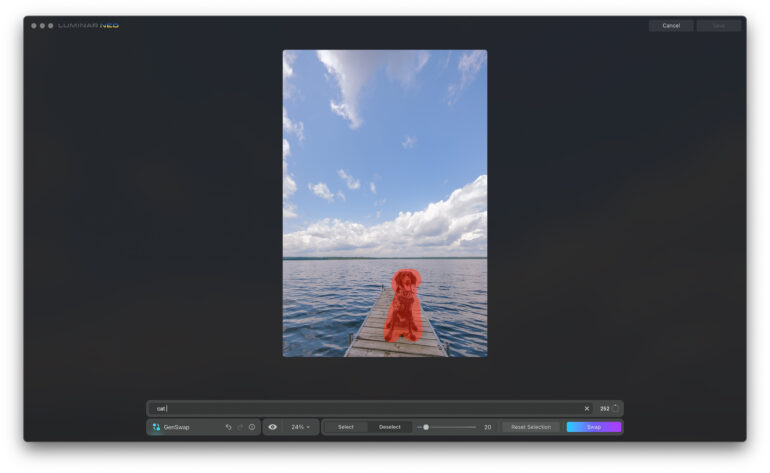
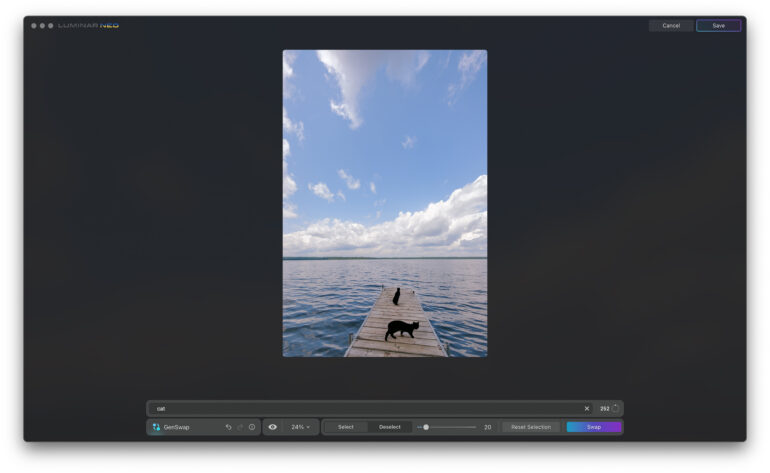
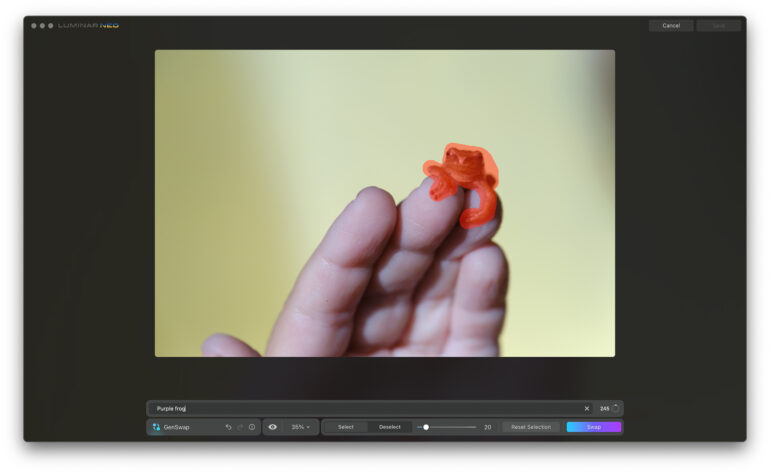
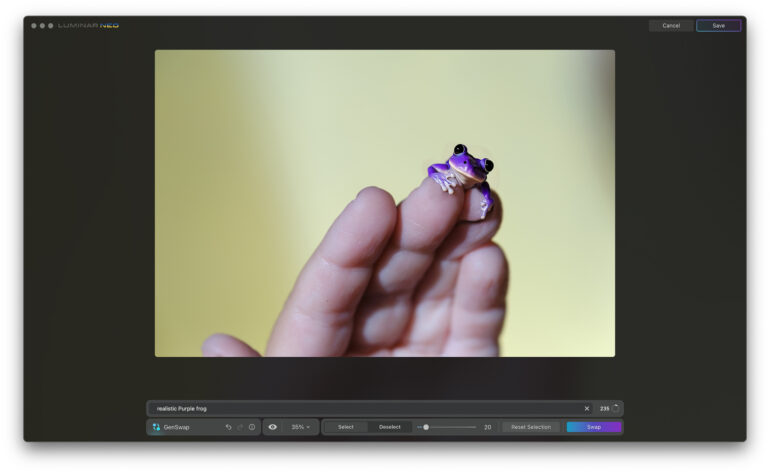
GenSwap replaces an object in a photo with an entirely different one. I was unable to get good results with the images that I tried. The replacement objects were rarely photorealistic. When I attempted to replace a frog with one of a different color, the newly generated amphibian looked like clip art. (It also added a 6th finger, though AI is still notoriously bad at hands). I tried to swap out a dog with a cat, and the system repeatedly generated two cats instead of one with eyes that could induce nightmares. Swapping out a diamond engagement ring for a men’s band was more photorealistic, but the size was off. The only acceptable result I was able to generate was swapping out a small quarter moon for a full moon.

Ease of Use
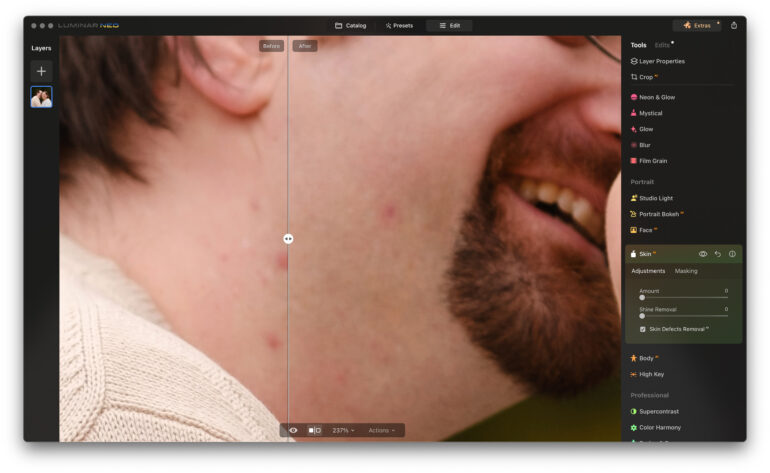
Luminar Neo is organized into three main sections: catalog, preset, and edit. The organization works pretty well, though the generative tools are in the catalog section when you would expect them to be in the edit section.

Catalog
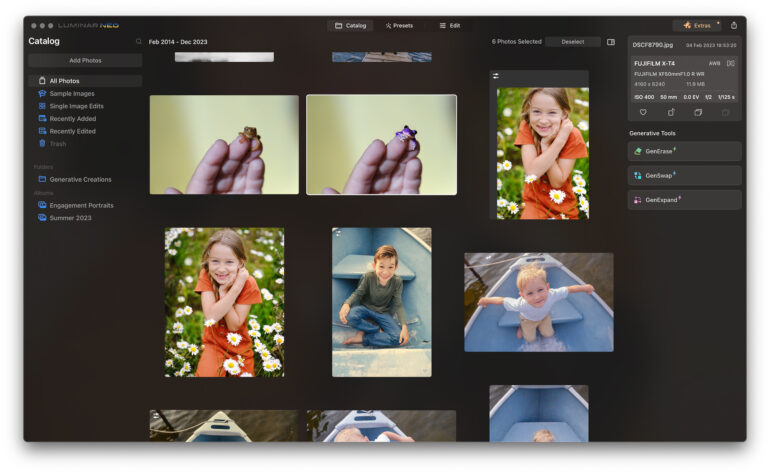
The catalog tab is a straightforward way to organize your images. You can add an entire folder of images from the hard drive at once, and it will appear under the folder section. If you want to create an organizational structure that differs from the hard drive folders, you can instead use albums.

On the right, you’ll see metadata plus buttons for each generative AI tool, which open in a pop-up window. Generative images are saved separately, so you don’t overwrite the original file, and they are also automatically added to a folder called Generative Creations.

Preset
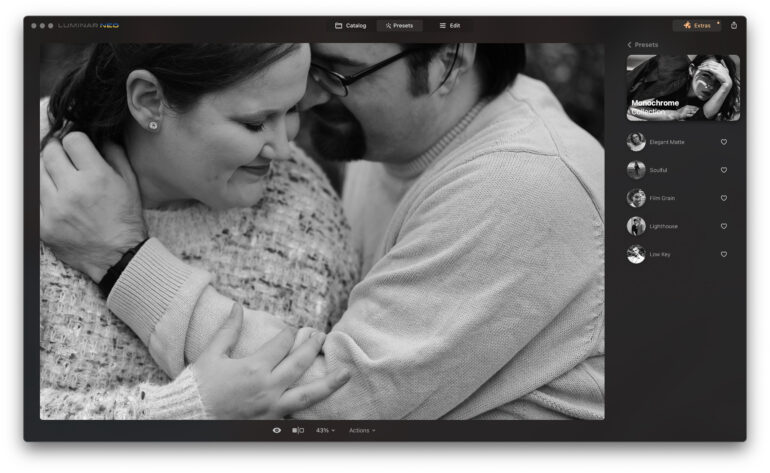
The second main part of Luminar Neo is the presets tab. Here, you can find image editing formulas to automatically apply to new images. Along with adjustments for things like color and contrast, these presets can also include AI-supported edits from the Edit tab, including things like teeth whitening and skin softening. This can be a huge time-saver and is different from other platforms. Lightroom, for example, creates presets from all the sliders, but if you want to apply things like teeth whitening to multiple images, you have to use the AI masking on one image, make the changes, and then sync the remaining images. Luminar Neo builds all of that into the preset itself. Photographers can edit images to their style, save it as a preset, and then apply it to every new image, which is a big time-saver.

However, there is a downside to that methodology. Some of the presets with Luminar Neo include the software’s body AI. Altering the shape of someone’s body isn’t among every photographer’s ethical guidelines, including mine. Even then, when photographing an athlete, the thinning edit has the opposite effect, creating a less flattering portrait when muscle mass is desired.

Edit
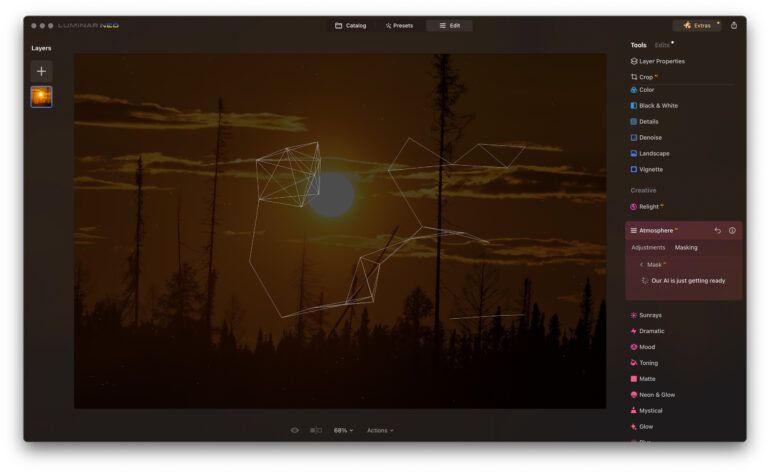
The edit tab contains a sidebar full of all the different editing options. Some are fairly standard, like exposure, contrast, and sharpening. Sadly, the RAW Develop tab doesn’t have the camera’s built-in profiles, so I lost the Fujifilm color profile option. You can upload custom DCPs, but the camera profiles aren’t integrated automatically like with Lightroom and Capture One. The other downside to working with RAW files is that the image “develops” once you leave the Develop RAW tool. If you apply other edits, you can still go back, but you won’t see the other adjustments in the Develop RAW tool.

Once an edit is applied, it moves to the Edits sub-tab. If you want to increase or decrease the strength of an edit, for example, you’ll need to go find it in the Edits tab. This is also how you undo part of the edit. 

Images can be exported from the file menu. The option to resize is available, but it lacks features like adding a watermark and renaming the files. (I re-imported the watermarked samples here into Lightroom.)

Image Quality
While Luminar Neo contains a lot of the usual tools photographers can find from pretty much any program, the software has a long list of special effects. Yes, those special effects could also be done with Photoshop, but they’re a bit faster and simpler inside Neo. The Essentials sub-category contains all the usual culprits, like exposure adjustments and color editing, along with an AI-based structure tool to adjust detail and clarity. There’s also an erase tool. This worked fairly well to remove a flyaway hair across the face, but it worked best done in sections.

The Creative sub-category is where much of the fun resides. Some of the key tools include:
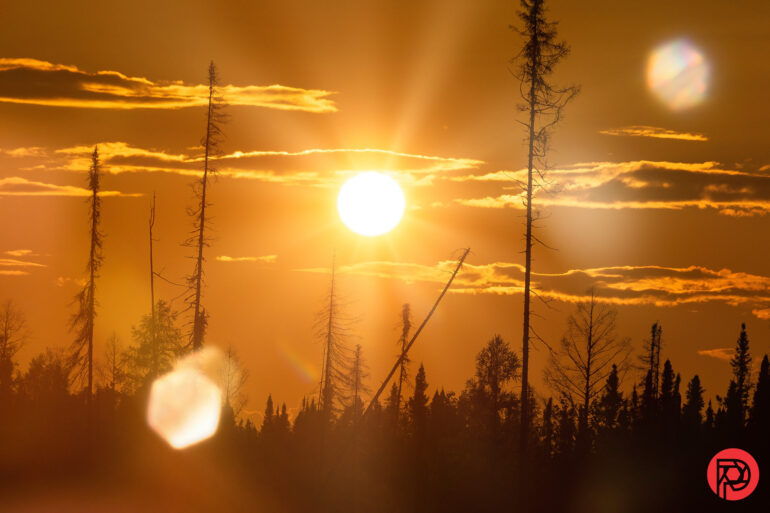
Sun rays and flare added in Luminar Neo
  • ReLight AI is a tool to adjust the lighting of the image. This uses depth mapping to adjust the close brightness and the far brightness. For example, you can increase the near brightness and reduce the far brightness to look like flash was used, though it won’t do things like add catchlights and shadows on the face.
  • Atmosphere AI allows you to add fog and haze to a photograph. I had a bit of a hard time getting it to look like real fog, but it can work for certain images.
  • Sun rays is one of my favorites, allowing you to add light rays to any photo by dragging and dropping a sun onto the image and using sliders to adjust things like the warmth and number of rays. This works best if you have an image that already has a bit of sun in it; it just needs more rays.
  • Blur: allows editors to add motion, Gaussian, twisted, or tilt-shift blur using masking, including AI-powered masking.
  • Film grain is self-explanatory, but it is still one of my favorites.

The portrait sub-category has tools designed for images of people. Again though, these effects will automatically apply to every person in the photo without manually adjusting the masking, so it’s not quite as quick working with group photos.
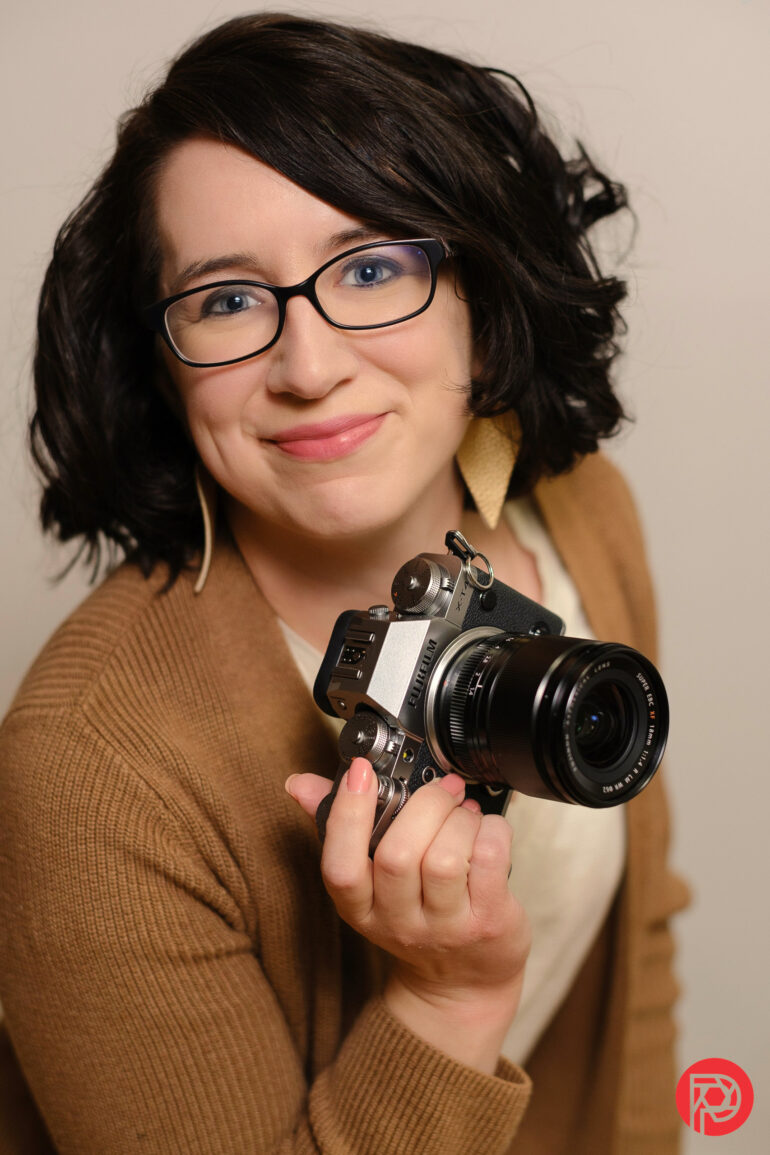
  • Studio light is another tool to adjust the lighting in portraits. This one I found wasn’t super intuitive and was difficult to get started with without a tutorial. There is the option to add patterned light here, like blinds or lace.
  • Portrait Bokeh AI adds more background blur using AI masking.
  • Face AI can slim the face, enhance the eyes, add color to the lips, or whiten the teeth. The AI masking seemed to work fairly well and makes quick work of tasks like whitening teeth across multiple images.
  • Skin AI is AI-based skin softening and shine removal. There’s also a checkmark to remove skin defects, but this only works with red spots. That’s great for leaving freckles and moles intact, but means it doesn’t work well on darker skin where acne can be more brown than red.
  • Body AI has two sliders. The shape slider narrows the entire body. Ethics aside, this works when used sparingly, but if you have a headshot where part of the shoulder is cropped off, the software replicates the shoulder at the edge.  The abdomen slider is like taking a Photoshop pucker or contract Perspective Warp tool over the stomach. Sometimes, that works, but it also messes with patterned shirts and sometimes skews the surrounding areas a bit.
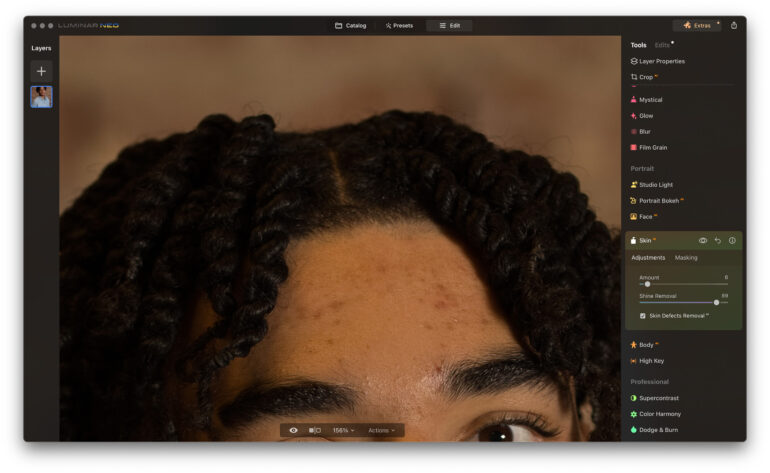
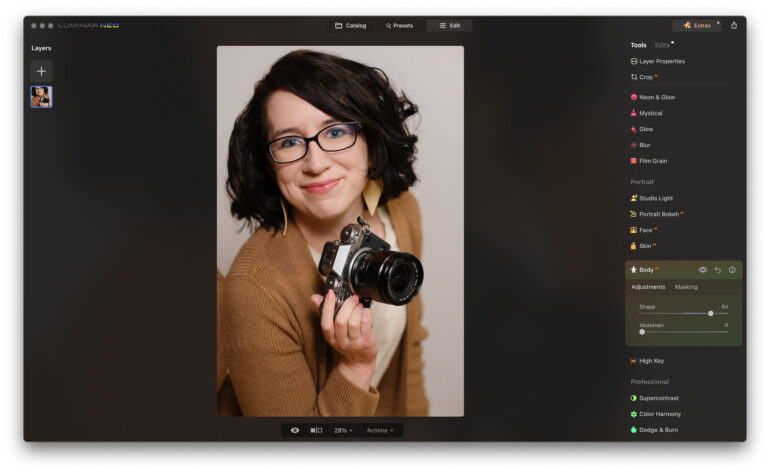
The final sub-category is Professional, where a few more advanced tools reside. Here, you’ll find Color Harmony with things like warmth and split color. There are also tools for super-contrast and local adjustments sit here as well, including dodge and burn and clone.

On the left side of the software sits the layers button. These aren’t really the same things as Photoshop layers. The layers here are special effects, which fall into four categories: flares, light leaks, sparklers, and stardust bokeh. When done right they can appear realistic, but you’ll need the correct type of photo — a lens flare won’t look realistic on a photo taken on an overcast day, and sparklers look best in a photo taken in the dark. These can be customized with masking, and there’s the option to download more as well.

Who Should Buy It?
There are three main reasons that Luminar Neo stands out from other software. The first is the ability to create presets that include special effects like sun rays as well as AI masking such as teeth whitening. Those can then be applied to other photos with just a few clicks. The second reason is the special effects that are typically faster than creating a similar look in Photoshop. The third reason is simply that the program makes complex edits easier for beginners.

However, there are several reasons that I personally won’t be switching over. The first is that the software lacks built-in RAW profiles — using Fujifilm’s color profiles saves me too much time in color editing to use software that doesn’t have that option. (There are custom profiles you can import, but who has time for that?). The second is that it’s difficult to use those AI-portrait editing tools for images of couples and groups. While Lightroom’s AI masking has a few more steps involved, I can pick and choose which person to apply the teeth whitening to. The final reason is more personal. My editing philosophy is to correct temporary flaws like acne. I will also correct things that are exaggerated in photos that didn’t come across that way in person, such as whitening teeth after warming up the rest of the photo. That philosophy means I wouldn’t use many of Luminar NEO’s most time-saving tools.

I would recommend Luminar Neo more as a tool for applying special effects after starting all the color edits in Lightroom or Capture One. I would also recommend it to beginners, but with some hesitation, as beginners tend to overdo their edits, and that’s easy to do when Neo makes editing easy. Beginners are going to have to be able to take a step back and determine if they took the edit too far — most sliders should be used with smaller adjustments.

Tech Specs and Main Features

Skylum lists these new features for Luminar Neo 1.17.0:

  • GenErase: A next-generation Erase tool that not only removes unwanted distractions from your images, but also intelligently replaces those areas using content-aware AI tools, providing a focused and distraction-free composition. This feature preserves the integrity of your photos by filling in the gaps with textures and other elements using AI to match the surrounding area. GenErase can seamlessly remove objects such as trash, street signs, utility poles, vehicles, graffiti, crowds, and more to preserve the beauty of the composition. 
  • GenExpand: A revolutionary tool that empowers users to break free from traditional aspect ratios and add a new dimension to their original compositions. With GenExpand, you can effortlessly extend the boundaries of your photos, whether you’re creating panoramic landscapes for vast mountain ranges, serene lakes, etc. or want to give your favorite images more breathing room to stand out against a beautifully balanced background.
  • GenSwap: This technology allows photographers to change the image composition by replacing or swapping objects or seamlessly adding new details generated by AI according to the user’s prompt. GenSwap allows you to also enhance images by adding elements such as trees, animals, and more, transforming your photos into mesmerizing visuals. For example, change an unpleasant tree for a better looking one, add a bird to the sky, or drop a stone in the desert to make the photo complete.    

The Phoblographer may receive affiliate compensation for products purchased using links in this blog posted.

Luminar Neo Review: How Much Time can AI Save Photographers?
Luminar Neo is AI-streamlined editing software. The program puts time-consuming special effects and local edits at a level accessible for beginners and busy professionals on a time crunch. Its wide range of AI masking tools can be integrated into presets themselves, so one tap on the preset can add anything from teeth whitening in portraits to light rays on landscapes. And that’s all in addition to things like color and contrast adjustments. While the software includes basic tools like exposure, eraser, and color editing, its biggest draw is the special effects that are easy to apply, mask, and customize.

While the AI tools streamline many tasks, others are less so. Any portrait effects are applied to everyone in a group photo, for example, and manual masking is needed to individualize them. The AI-based skin defect removal didn’t work consistently across different skin tones. Some of the built-in presets also include body shape adjustments that not everyone wants or needs. It lacks the camera-specific RAW color profiles that come ready with other programs.

Luminar Neo has several excellent special effects and quick AI tools wrapped in a beginner-friendly platform. I would recommend it for beginners who don’t want to mess with time-consuming edits and as an add-on for quickly applying special effects. However, there are a few missing features and ethical gray areas that would prevent me personally from switching over. I’m giving Luminar Neo three out of five stars.

20 Enchanting Winning Photos In Nature Category, Selected By Tokyo International Foto Awards 2023

20 Enchanting Winning Photos In Nature Category, Selected By Tokyo International Foto Awards 2023
ADVERTISEMENT

The Tokyo International Foto Awards (TIFA) has concluded yet another remarkable year, receiving thousands of submissions. The announcement of winners has left us in awe of the diverse array of beautiful, shocking, authentic, creative, and magical photographs chosen this year.

The Nature category, in particular, distinguished itself with captivating moments in wildlife, breathtaking sunsets, and the rare beauty of macro photography. Join us on this captivating 20-photo journey, showcasing a selection of the aforementioned artworks.

More info: tokyofotoawards.jp

“This photograph breaks boundaries between humans and animals. Showing that animals like humans have their own distinct personalities. The video of this turtle I posted went viral globally reaching over 800 million views across social/media channels as no one had ever seen a turtle blow bubbles while deep in the water out of their mouth. Scientists, marine biologists, and turtle experts were all blown away – never seen anything like it.”

tokyofotoawards , charlottepiho Report

“Hehuan Mountain Dark Sky Park(HMDSP) in Taiwan is far away from the light pollution of urban areas, it is easy to be here by driving to stargaze the dark sky over 3000m altitude all year. Taiwan is one of the most ecologically diverse areas in Asia, due to Eurasia’s animals and plants migrated here during the ice age, there are some special species, like Alpine rhododendron, that could be found here. It took me two years to scout and wait for the best timing to complete this collection, it presents the landscape with dark sky I love in this beautiful mountain.”

tokyofotoawards , ethansu6 Report

ADVERTISEMENT

ADVERTISEMENT

“This series is dedicated to the winter magic of “Risiintuturi National Park” in Finnish Lapland. This park experiences very unique weather conditions that are found in only a few other places in the world: the humidity of the hilly marshes, the snow, and the extreme cold give rise to a phenomenon that Finns call “Tykky,” the “arctic galaverne,” a thick and heavy layer of ice that completely covers the spruces, forcing them to bend and take on bizarre shapes reminiscent of dinosaurs, golems, or any other creature one can imagine. I had only 24 hours to capture this park under the magnificent

I’m an Italian landscape photographer with a passion for nature and travel. I started as a travel photographer in 2020 and then shifted my focus entirely to capturing natural landscapes because of the peace and serenity they can provide. I want to communicate my experiences with nature; looking for that part of me that lives in the places I photograph is my purpose in photography. Currently, I am working on several photography projects that involve the preservation of landscapes threatened by global warming.”

tokyofotoawards , stefano_balma Report

“In southeastern Georgia, United States, as water breathed life into the Cypress trees, summer met winter, and sunlight infused nature with an artistic touch, the park was a living outdoor art exhibit, with nature’s masterpieces on display at every turn.

Fenqiang Liu is a fine art nature photographer based in Orlando, Florida. His work captures breathtaking moments of natural beauty and transforms them into captivating art pieces. With an education and experience in drawing, Chinese literature, cinema, and photography, Liu utilizes his unique blend of cultural influences from both the East and West, along with his artistic background and mastery of photography, to express his thoughts and emotions in a distinct and meaningful way. He has achieved resounding success in photography and earned numerous prestigious international photo awards.”

tokyofotoawards , fenqiangliu Report

ADVERTISEMENT

“This is a dammed lake formed by the temporary accumulation of melted snow. Normally, the area is overgrown with trees, but for a limited time, a phantom forest appears on the surface of the water. It is a paradise as well as a phantom water forest, where birds and people can be seen nesting.

I started photography in 2013. Because I wanted to preserve the beautiful night view of Nagasaki, which I visited on a trip, in photographic form. In the beginning, I mainly photographed night views of cities, but later I became fascinated with nature photography. I am currently on a quest to capture the scenery of Chiba, where I was born and raised, and other places in Japan. I confront photography from both analog and digital perspectives.”

tokyofotoawards , takahirogamou Report

ADVERTISEMENT

“In North Manitoba in winter, I witnessed the Mom Polar Bear emerging from her den with 2 young cubs, discovering the world for the very first time. Photography taken in extreme cold and challenging conditions (-57° Celsius)

Polish-American, living now in France, multi-awarded in different international photography contests. Professional wildlife photographer and great traveler, I am traveling all over the world with my husband, trying to capture the wonders and the beauties, but also the fragility of our Planet. In nature, and especially in arctic and cold places, this is where I like to be, and this is where I can express my creativity. Each reportage is always beginning by a careful preparation and study of the species to photograph, their behaviors, and places to explore. This is when the dream begins …”

tokyofotoawards , brunodorotaphotography Report

ADVERTISEMENT

“This series of photos is about the Canadian winter Rockies, winter is the best time to have some shots there and the most beautiful time of the year!

I am a Landscape Photographer in Banff National Park Area, Canada.”

tokyofotoawards , carlliyongnan Report

“Waiting for the sun to set, lions are getting ready to hunt.

Jacques-André Dupont is a passionate Montreal photographer whose work focuses on wildlife and nature. His work has been featured in several major medias like Canadian Geographic, National Geographic, Africa Geographic, Widllife Photographic, Outdoor Photography, Paris Match, the London Telegraph, China News, La Pravda, etc. His pictures have been selected/or won several photo competitions internationally. And they have been been exhibited in several countries around the world. With is photography he only wants to achieve one simple goal: bring the beauty of nature into light.”

tokyofotoawards , jadupontphoto Report

ADVERTISEMENT

See Also on Bored Panda

“Tidal flats that are exposed during low tides, reveal an intricate network of water channels in varying shades of aqua. The massive tidal movements, reaching up to 12 meters, create a dynamic landscape of winding water paths and contrasting shifting sands. This image is a testament to the raw power and beauty of nature, showcasing the mesmerizing spectacle of the largest tidal movements in the Southern Hemisphere.

Julie Kenny honed her photographic skills in analog-based film photography, utilizing 35mm, medium, and large format cameras during her studies at TAFE. After completing an Advanced Diploma of Applied Science in Photography, Julie furthered her studies at Edith Cowan University, undertaking a Bachelor of Communications and Diploma of Education. More recently, Julie merged her knowledge of traditional mediums with new technologies, gaining a commercial drone license. Since this undertaking, her work has strongly focused on highlighting the beauty of regional locations.”

tokyofotoawards , juliet.romeo.kilo Report

“2 young adult lions having a tender moment with one of the tribe’s kittens.

Jacques-André Dupont is a passionate Montreal photographer whose work focuses on wildlife and nature. His work has been featured in several major media like Canadian Geographic, National Geographic, Africa Geographic, Wildlife Photographic, Outdoor Photography, Paris Match, the London Telegraph, China News, La Pravda, etc. His pictures have been selected/or won several photo competitions internationally. And they have been exhibited in several countries around the world. With his photography he only wants to achieve one simple goal: bring the beauty of nature into light.”

tokyofotoawards , jadupontphoto Report

ADVERTISEMENT

ADVERTISEMENT

See Also on Bored Panda

“In the heart of the Madagascar forest, a curious lemur holds emerald-green vanilla leaves in its paws, a fragrant and enchanting treasure hidden among the branches. The crowned lemur blends harmoniously into the surrounding environment, embodying the sweetness and beauty of the lush Malagasy rainforest with eyes full of wonder.

Marcello Galleano, an entrepreneur in the field of nutraceuticals and herbal medicine, has always been a lover of nature and adventure trips. He has visited more than 85 countries worldwide and collaborates with non-profit associations in Africa and South America. Passionate about wildlife photography, he loves to capture the most incredible moments that the various environments offer and share the beauty of the world.”

tokyofotoawards , marcellogalleano Report

“Location: Moalboal Sardine run is just like a painting of nature with shape keeps changing every second, sometimes like a wall, sometimes looks both chaotic and organized, sometimes like the sky with stars in the sea It depends on the way we interact with them.”

tokyofotoawards Report

“Leafy sea dragon that listed as a near threatened species and endemic to Australia. It was always difficult to find them due to mimicking the surrounding kelp although their size of 40 cm even. It is one of the most beautiful elaborate mimicry creatures on the earth.

I am working as a researcher at a medical company but I want to concentrate on shooting in 2022.”

tokyofotoawards , sayaka_ichi_uw Report

“During my expedition to Antarctica, I met and took a series of photos with magnificent King Penguins. Observation of the colony, their habits, and communication brought great pleasure and interest in the further study of these amazing animals. There are 450,000 pairs of King Penguins in South Georgia, which is about half the world’s population. The island has more than 30 colonies in total.”

tokyofotoawards , artshestakov Report

Art patron Saloni Doshi opens up her collection of photographs to the public

Art patron Saloni Doshi opens up her collection of photographs to the public

Mumbai-based art collector and patron Saloni Doshi is showcasing a selection of abstract and landscape photographs in the second edition of ‘The Right To Look’

Mumbai-based art patron Saloni Doshi has been collecting artworks since the age of 23. Two decades into her collecting journey, she felt a deep desire to make her art more accessible to the public. The 44-year-old patron took a step in this direction last year when she showcased works of contemporary photography from her archive in the exhibition, The Right To Look Part I. Following its success, the exhibition’s second edition opened to the public in Mumbai earlier this month.

While the first edition focused on figurative and performance photography, the second edition, curated by Amit Kumar Jain, is all about landscape and abstract photography from Doshi’s collection. “Photography is a unique medium, which beautifully captures moments that pass us by. I started my collection with photographs, buying them extensively very early on,” says Doshi.

As a first-generation art collector, Doshi’s initial hurdle was making her family understand why she chose it as a calling. For her, it started as a passion, but it didn’t take long for it to become a vocation. “I was in my early 20s, and at that time it was not a profession that people had heard of. So, it was a difficult beginning,” she adds.

In 2009, Doshi converted a part of her warehouse space in South Mumbai to launch Space118 studio. She had a simple reason—to provide the one thing that artists often don’t have access to in urban areas, which is space. Over the years, the space has hosted 450 artists as part of residency programmes for budding artists.

The Right To Look Part II , Space 118’s first exhibition this year, dwells deeper into the world of photography. The showcased works are rooted in historical traditions and contemporary practices, enabling people to reflect on spatial relations. The photos capture places of comfort, those of disarray—a moment of disquiet where the natural world collides with sprawling concrete urban jungles, the exhibition brochure explains. It also makes people ask poignant questions, such as what happens to the places we leave behind.

The exhibition is divided into five rooms, wherein the photos are bound together by a theme. In the first studio, The Promised Land, people will get to see works such as Raghu Rai’s Self Portrait, Mumbai (2019) and Madhya Pradesh (1982), Sohrab Hura’s River (2005) and Ketaki Sheth’s Man Under Flyover (2015), among others. The theme refers to the land that people inherit from their forefathers; land that waits for us, always and forever, says Doshi. “It’s interesting to see how Amit has made sense of works that I have bought over 15 years and presented them under a theme,” she adds.


The passage of time is explored through clocks and places in studio two, A Crack In The Surface. For instance, there is Raqs Media Collective’s Sleep Clock (2018), a print with humour about the passing of time and its effect on various psychological states of being, and Priyank Gothwal’s Public Clocks series, which documents actual clocks of Mumbai. Raghu Rai’s 1973 work, Jantar Mantar, Delhi, shows how the place was before, urging one to reflect on how times have changed.

One of the interesting works in studio three, Stuck In A Moment, is from Pakistani photographer Bani Abidi’s The VIP’s Waiting Room (2009) series, wherein photos examine the interiors of buildings. Doshi explains that there is a lack of doors and no clear entry or exit point in photos, which leaves people in a dilemma as they wonder for how long they have to wait. 

The exhibition raises an important question about ‘what happens when nature no longer nurtures us’ through the works displayed in studio four, The Wasteland. Doshi says the works are an artistic enquiry into where people have taken the planet. “For instance, Arun Kumar HG’s Landscape (2011), shows cities that have grown out, trees that have grown beyond space, and bridges that have taken over spaces. Our cities have become a wasteland and we have to question the exploitation that’s happening in the environment,” she explains.

Other works such as Puja Vaish’s From Memories of Under Construction (2012) and Gigi Scaria’s In Conversation (2010) push people to reflect on the receding natural landscape that’s being overtaken by a consumeristic culture.

Talking about the theme for the last studio, A Light Through The Cracks, Doshi says the purpose was to leave people hopeful and reassured. It includes Surekha’s The Whispering Silence Photo-Action (2010) where people can see a lush tree braving its odds against in an unsporting environment and Neha Choksi’s Lone Orange (2008), where a single orange atop a barren tree shows resilience.

One of the main aims of this exhibition is to expose people to contemporary works, Doshi says. “It’s also about educating people about all kinds of photography, introducing them to the medium and seeing what kind of photography connects with people,” she adds. A book, based on the collection, will also be published.

The Right To Look – II is open to the public from January 11 to March 16 and is on view at Space118, Mumbai from 11 a.m. to 5 p.m., including Sundays. 

What’s Brewing – Midtown Reader hosts wildlife writer and photographer meet-and-greet

What’s Brewing – Midtown Reader hosts wildlife writer and photographer meet-and-greet

TALLAHASSEE, Fla. (WCTV) – Let’s take a look at this morning’s what’s brewing.

Do you love wildlife photography? Have you wondered what the story behind the wildlife is?

If you answered yes to the above questions, this event is meant for you!

Don’t miss out on meeting with writer and photographer Kirsten Hines, who will be in conversation with Julie Wraithmell, executive director of Audubon Florida, for her newest release, “Wild Florida.”

Hines provides a captivating visual and narrative journey into the ecology of Florida’s animals in the book. The intimate and artistic photographs in this book introduce readers to the wide variety of wildlife that thrives within the state.

You’ll have the chance to meet this writer at Midtown Reader in Tallahassee tomorrow from 6:30 to 7:30 p.m.

To stay up to date on all the latest news as it develops, follow WCTV on Facebook and X (Twitter).

Have a news tip or see an error that needs correction? Write us here. Please include the article’s headline in your message.

Keep up with all the biggest headlines on the WCTV News app. Click here to download it now.

AGoldPhoto Pet Photography looks to raise $10K for the Humane Society of Tampa Bay

AGoldPhoto Pet Photography looks to raise $10K for the Humane Society of Tampa Bay

TAMPA, Fla. — The Humane Society of Tampa Bay and AGoldPhoto Pet Photography are teaming up again to raise $10,000 for the shelter.

Adam Goldberg started photographing animals at the shelter in 2016.

He replaces intake photos with professional pictures.

“I started volunteering at the Humane Society here in 2016. It was just for fun and was never a business idea, and slowly, I saw my photos online, and friends of mine said, ‘Hey, can you take photos of my dog too?’ I kind of begrudgingly did it, and long story short, it blew into a full business,” said Goldberg.

He started AGoldPhoto Pet Photography more than five years ago. For the past three years, he has photographed families and their pets at his studio in South Tampa.

Once a week, he goes to the Humane Society of Tampa Bay to photograph the shelter animals.

“We post them online. Oftentimes, I’ll do a Facebook post, but then on Instagram and TikTok, I’ll do a behind-the-scenes video showing the before and after. Some of our videos have gone viral because it’s like an intake photo versus our photo. It’s like night and day, different, doesn’t even look like the same pet,” said Goldberg.

For the past three years, he has also created a coffee table book titled “Tails of Gratitude – A Collection of Thank You Notes from People to Their Pets.”

Blurred Photo Background (4).png

AGoldPhoto Pet Photography

It is a way for pet parents to thank their pets for everything they do for them and help raise money for the Humane Society of Tampa Bay.

Goldberg is accepting applications from people who would like their pets featured in the book. Successful applicants will be guaranteed a double-page spread in the book and pay a $185 registration fee, 100% of which will be donated to the Humane Society of Tampa Bay.

The book is set to be published in late November with a launch party.

Photo Shoots will take place at AGoldPhoto Pet Photo Studio, located in South Tampa. Participants will get to select their favorite photo for the book, write a thank you note to their pet(s), and have the opportunity to purchase printed photographic artwork for their home or office.

“The Humane Society of Tampa Bay is thrilled to work with AGoldPhoto Pet Photography on Volume 4 of Tails of Gratitude. We love that the project is continuing to help the homeless pets in our care,” said Sherry Silk, CEO of the Humane Society of Tampa Bay. “We also love their Second Shot adoption photo program where AGoldPhoto takes new photos of our adoptable animals to give them a “second shot” at finding a home.”

The application to participate in the project can be found here.

Goldberg is accepting applications from now through June 30.